When I first needed an online booking system for my WordPress site, I went straight to Calendly like everyone else.
It worked fine for a while, but I quickly noticed a frustrating pattern: I was paying a monthly subscription for a tool that lived completely outside my website. I had zero control over my data, and the design never quite matched my brand.
Plus, I felt like I was being punished for succeeding. My bill kept climbing every time my business grew because I had to pay more for every new seat or advanced feature I added.
That’s when I started exploring WordPress booking plugins. I found that they’re much more affordable and give you complete control over your entire scheduling system.
I’ve spent days testing more than a dozen booking plugins to find the absolute best Calendly alternatives for WordPress users.
Whether you’re running a small business, a coaching practice, or a fast-growing agency, these options provide the professional scheduling features you need without the ‘Calendly tax.’
Quick Comparison: 7 Best Calendly Alternatives
Before I go into the full reviews, here’s a quick comparison to help you see how the top Calendly alternatives compare to each other:
| Product | Starting Price | Best For | Key Feature |
| Sugar Calendar Bookings | $49.50 per year | Small business owners who want a lightweight calendar that just works | Smart filters to view all appointments at a glance |
| WPForms | $49.50/year | Service providers and freelancers | Conditional logic for qualifying leads |
| Simply Schedule Appointments | $99/year | Consultants and agencies working across time zones | Real-time sync with Google Calendar prevents double-booking |
| Booking Calendar | Free (Lite) | Property owners and rental businesses | Visual calendar shows availability at a glance |
| BirchPress | $99/year | Service-based businesses managing multiple staff schedules | Color-coded staff appointments in one dashboard |
| Simplybook.me | $8.25/month | Enterprise-level businesses needing scalable booking | Scalable solution for enterprise-level brands |
| Easy Appointments | Free (Lite) | Budget-conscious small businesses with multiple locations | Multi-location support without premium add-ons |
Why Use a Calendly Alternative?
Online booking tools like Calendly are convenient, but they aren’t always the best long-term solution for growing businesses. If you’re already using WordPress, then a booking solution that runs directly on your website gives you more control, flexibility, and cost savings.
Here’s why many businesses choose a WordPress booking plugin instead:
- You own your data: I’ve watched external platforms change their terms and lock users out of their own client lists. By using a plugin instead, all appointment details, customer information, and booking history stay within your WordPress database. This gives you full control over your privacy and security.
- No monthly platform fees: Software as a Service (SaaS) tools like Calendly often charge per seat, meaning your bill climbs every time you hire a new team member. With WordPress plugins, you usually pay once for the plugin license. Typically, there’s no per-appointment or per-use fees, making plugins much more cost-effective as you grow.
- Complete design control: You don’t want a ‘Powered by Calendly’ badge ruining your professional site. Keeping everything in-house makes it easier to match your booking forms to your branding, which instantly makes your site look much more professional.
- Native integrations: You can connect your calendar directly with your WordPress forms, preferred payment gateways, email marketing service, SMTP plugin, and more. This means a smoother experience for your customers and better conversion rates for you.
- One dashboard: I don’t have to log into an external website just to see my schedule. You can handle your content, your search engine optimization (SEO), and your appointments all from the same familiar WordPress dashboard.
Expert Tip: Because many booking plugins track visitor activity and store appointment details, you must disclose this in your Privacy Policy to remain GDPR compliant.
My Proven Method for Testing the Best Calendly Alternatives for WordPress
I’ve seen booking plugins that look great in a demo but fail miserably when you try to perform important tasks, like syncing them with a busy team’s Google Calendar.
I didn’t want to give you a list based on marketing fluff, so I spent days inside the WordPress dashboard to see how the top WordPress booking plugins actually behave in real-world scenarios.
Here’s what I focused on during my hands-on testing:
- Setup time: I tracked how long it took from the moment I hit ‘install’ to having a working booking form on my site. If a plugin takes three hours just to set up a simple calendar, that’s a complete non-starter for most of my readers. In particular, I looked for tools with smart setup wizards that do the heavy lifting for you.
- Booking experience: I didn’t just test these plugins on my desktop computer. I also went through the customer-facing flow on multiple smartphones and tablets. I checked for clarity, button size, and whether the interface felt clunky or required ‘pinching and zooming’ just to select a time slot.
- Calendar sync: I connected multiple external calendars (like Google Calendar and Outlook) to see how well each plugin prevented double-bookings. I intentionally created overlapping appointments to see if the plugin’s conflict detection caught them. I wanted to make sure you never have to apologize for double-booking again.
- Customization options: I tested buffer times (to ensure you have a 15-minute break in between meetings), minimum notice periods (so nobody can book you five minutes before a call), and automated notifications (to see if I could customize the email templates to match my specific brand voice).
- Payment integration: I tested the checkout flows with popular payment gateways like Stripe and PayPal. I looked for plugins that keep the user on your site rather than redirecting them to a third-party page, which I’ve found significantly improves conversion rates.
- Performance: I monitored page load times using tools like PageSpeed Insights and GTmetrix. Some booking plugins are bloated and load heavy scripts on every single page of your site, even where there isn’t a calendar. Also, I prioritized lightweight plugins that only load assets when they’re actually needed, keeping your SEO rankings safe.
Why Trust WPBeginner?
For this review, our team tested every booking plugin on real WordPress installations, the exact same way you’d use them. We installed each plugin, set up appointment types, connected calendars, and processed test bookings.
We also compared speed, ease of use, and long-term reliability. This means you can choose the best Calendly alternative for you based on real experience, and not just marketing claims.
You can read more about our process in our editorial guidelines.
Now, here are the Calendly alternatives I recommend:
- Sugar Calendar Bookings – Best for Small Business Owners
- WPForms – Best for Service Providers and Freelancers
- Simply Schedule Appointments – Best for Consultants and Agencies
- Booking Calendar – Best Plugin for Property Owners and Rental Businesses
- BirchPress – Best for Multi-Staff Service Businesses
- Simplybook.me – Best for Enterprise-Level Businesses
- Easy Appointments – Best Free WordPress Booking Plugin
- What Is the Best Calendly Alternative for WordPress?
- Best Calendly Alternatives for WordPress: FAQs
- More Resources for Small Businesses
1. Sugar Calendar Bookings – Best for Small Business Owners
| Pros of Sugar Calendar Bookings | ✅ Set your business hours once and appointments automatically stay within your schedule ✅ Flexible for a variety of event types ✅ Set minimum notice periods and maximum booking windows to control exactly when customers can schedule appointments ✅ Customers can cancel their own bookings when plans change ✅ Store contact details, appointment history, and notes all in one place |
| Cons of Sugar Calendar Bookings | ❌ Limited integration options compared to some competitors |
| Pricing | Starts at $49.50 per year |
| Best For | Small business owners who want simple, reliable scheduling without overwhelming features. |
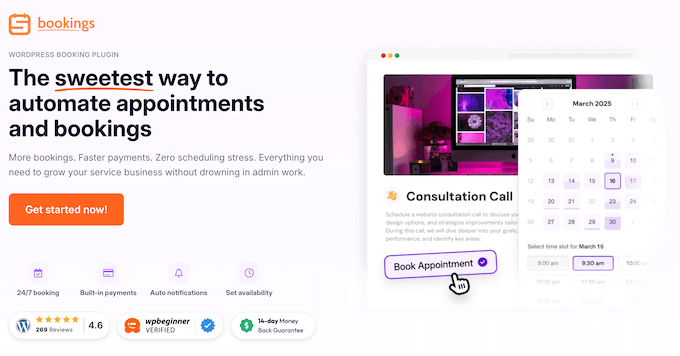
Sugar Calendar Bookings, the best event calendar plugin for WordPress, is a lightweight and straightforward appointment management plugin. It’s designed to handle 1-on-1 sessions and service bookings without the bloat of more complex systems.
💡 Want to learn more about Sugar Calendar Bookings? Then check out our in-depth Sugar Calendar review, where I cover the pros, the cons, and everything else you need to know.
In fact, I’ve found that Sugar Calendar Bookings balances power with simplicity better than almost any other plugin I’ve tried.
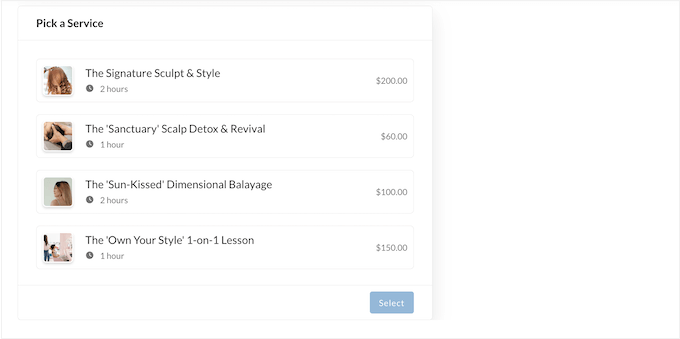
To start, the setup was incredibly smooth – I installed Sugar Calendar and created my first event within a few minutes.
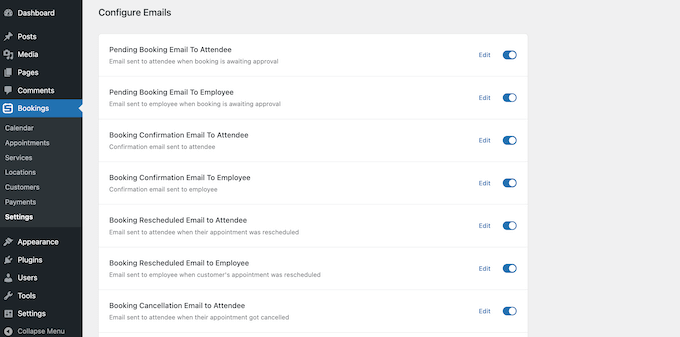
In addition, Sugar Calendar Bookings sends confirmation emails every time someone books, changes, or cancels an appointment. I tested this flow several times, and the emails arrived within seconds every time.
Time-slot management was easy too, as I set available hours for different services, and the calendar blocked off times that were already booked.
However, Sugar Calendar’s smart filters became my favorite feature during testing, as you can filter your view to see only specific services or staff.
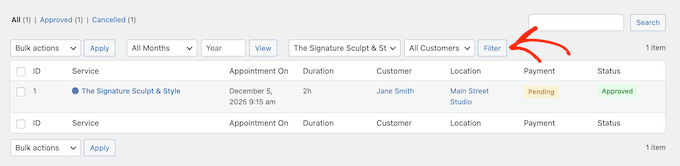
I also loved the ‘save once’ feature for location details, which is perfect if you frequently run classes or appointments in the same location.
Why I Recommend Sugar Calendar Bookings: This is one of the best Calendly alternatives for WordPress because it’s so straightforward and stable. It’s the ideal choice for small business owners who want a professional calendar that works right out of the box.
2. WPForms – Best for Service Providers and Freelancers
| Pros of WPForms | ✅ User-friendly interface ✅ Option to collect payments alongside form submissions ✅ Flexible integration options enhance scheduling workflows ✅ Powerful built-in conditional logic ✅ Can handle various form-related needs beyond just scheduling |
| Cons of WPForms | ❌ You might need more add-ons or plugins in order to create a complete scheduling solution ❌ Integration with external calendars such as Google Calendar requires additional steps |
| Pricing | Starts at $49.50 |
| Best For | Freelancers and service providers who need to qualify leads with specific questions before booking. |
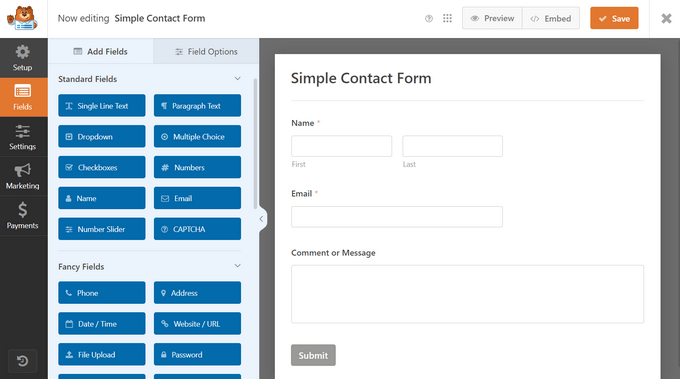
WPForms, the best drag and drop form builder for WordPress, is very easy to use. While you can use it for everything from contact forms to surveys, WPForms also includes powerful appointment booking features.
📝 Find out how we use WPForms on WPBeginner! Our detailed WPForms review has all the information you need.
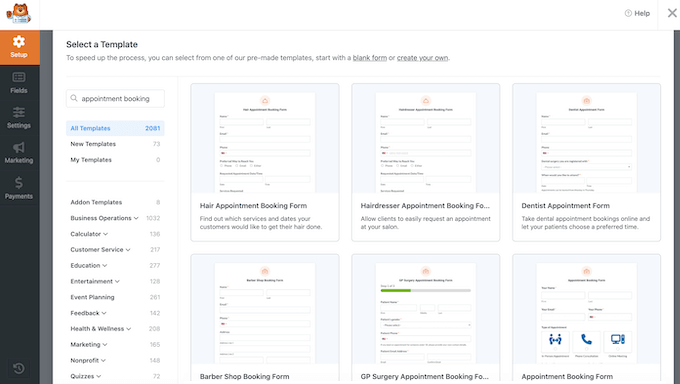
For this review, I used WPForms to build a booking form for a freelance web designer. Unlike a standard calendar, I wanted to qualify leads by asking them about their project size in advance.
I began with WPForms’ pre-built ‘Appointment Booking Form’ template, which gave me a solid starting point. I then used the drag-and-drop builder to customize this template, and had a professional intake form ready in under ten minutes.
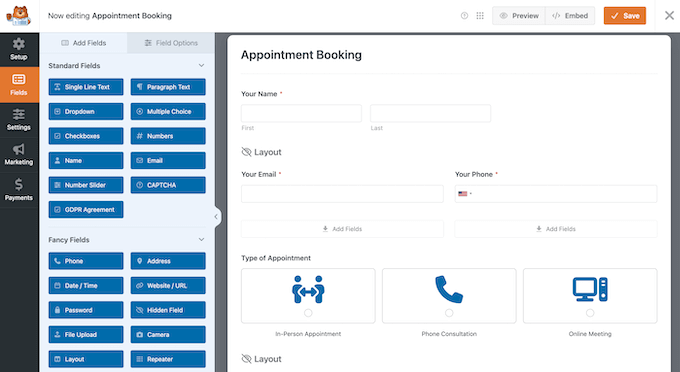
But the real magic happened when I tested WPForms’ conditional logic. This lets you ask follow-up questions based on previous answers, so you can qualify leads more effectively.
For example, if a client selected ‘eCommerce’ within my form, then WPForms asked them about their products and budget.
In my experience, standard booking apps simply can’t offer this level of flexibility.
However, keep in mind that WPForms is a form builder and not a dedicated booking app. This means you may need to perform additional steps, such as connecting your form to Google Calendar to avoid double-bookings.
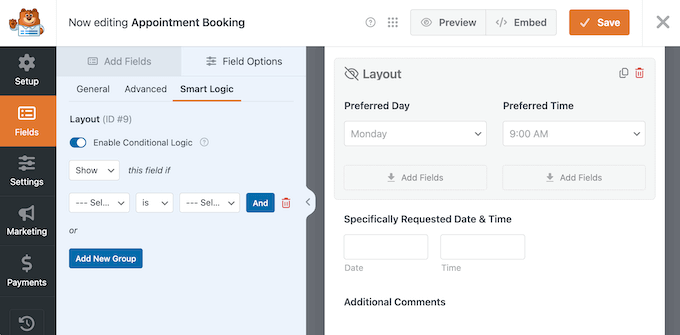
WPForms also lets you create multi-page forms, which are perfect for detailed appointment setups. I split a long intake form into three pages, and the experience felt more manageable, which can often reduce form abandonment rates.
Plus, you can use WPForms to create all kinds of additional forms, including contact forms, online surveys, and client feedback forms. In my opinion, this is a huge win.
Why I Recommend WPForms: This is a great choice for service providers and freelancers. In particular, WPForms is perfect if you need to ask a few qualifying questions before allowing visitors to schedule an appointment.
3. Simply Schedule Appointments – Best for Consultants and Agencies
| Pros of Simply Schedule Appointments | ✅ Real-time calendar sync helps avoid overbooking ✅ Supports classes and group events ✅ Manage resources such as meeting rooms along with your appointments ✅ Supports Twilio for sending reminders and confirmations via SMS ✅ Integrates with popular plugins including Formidable Forms, Gravity Forms, and MemberPress |
| Cons of Simply Schedule Appointments | ❌ Initial synchronization with external calendars can be tricky for some users ❌ Payment features might require extra configuration |
| Pricing | Starts at $99 per year. There’s also a limited free plan, so you can try before you buy. |
| Best For | Consultants and growing agencies working with clients across different time zones. |
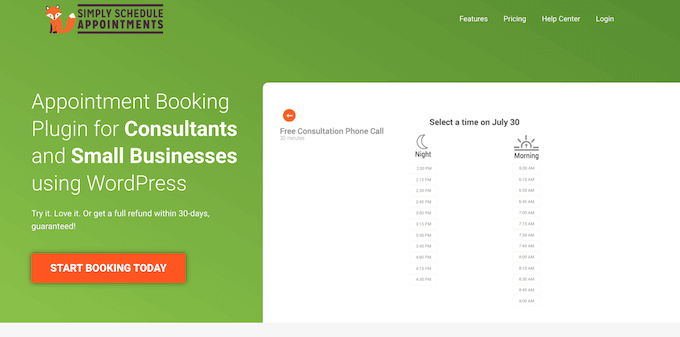
Simply Schedule Appointments is designed for consultants and agencies who need powerful features like real-time calendar sync, automatic timezone conversion, and video meeting integrations.
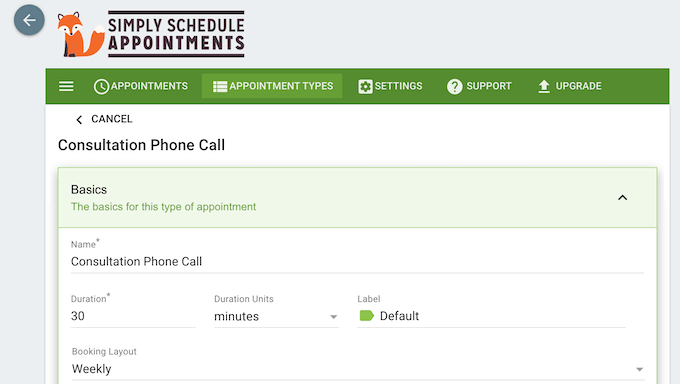
I tested Simply Schedule Appointments by acting as a digital agency working with international clients.
Straight away, the timezone conversion is a lifesaver for businesses who work globally. Simply Schedule Appointments detects where your visitor is and shows your availability in their local time.
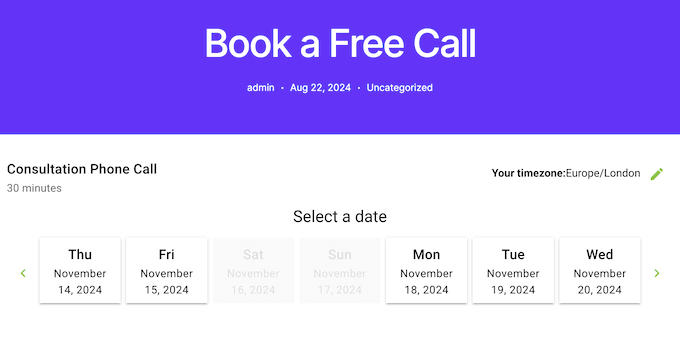
For logged-in users, Simply Schedule Appointments even displays their upcoming bookings. This lets your clients manage their own appointments without having to email you.
However, the standout feature was easily the real-time sync with Google Calendar. I added a doctor’s appointment to my phone’s calendar, and Simply Schedule Appointments instantly blocked that time off my website. This is exactly how you prevent the nightmare of double-booking.
I also tested the Google Meet and Zoom integrations. Simply Schedule Appointments automatically generated a unique meeting link and included it in the appointment confirmation email, without requiring any manual input from me.
Why I Recommend Simply Schedule Appointments: This is my top pick for consultants and agencies. If you regularly organize Google Meet or Zoom meetings, then Simply Schedule Appointments is also an incredibly powerful ‘set it and forget it’ option.
4. Booking Calendar – Best Plugin for Property Owners and Rental Businesses
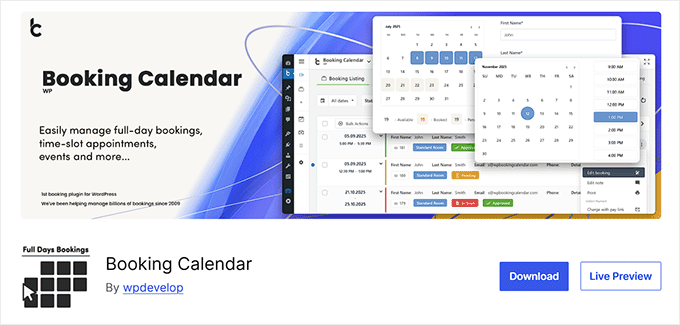
| Pros of Booking Calendar | ✅ Easy to configure and customize according to business requirements ✅ Free plugin that includes all the essential functionality ✅ Offers a visual calendar for users to quickly identify availability ✅ Robust notification system helps manage bookings efficiently |
| Cons of Booking Calendar | ❌ You’ll need to upgrade to the premium plugin, in order to access more advanced features |
| Pricing | You can download this plugin for free from the official WordPress repository. If you decide to upgrade, premium plans start at $41.87 for a lifetime license, plus 6 months of updates. |
| Best For | Property owners and rental businesses who want a visual, grid-based calendar that shows availability at a glance. |
Booking Calendar is one of the original and most stable booking systems for WordPress.
It provides a grid-based availability calendar, making it the top choice for rental properties, equipment rentals, or any other service that requires multi-day or time-slot bookings.
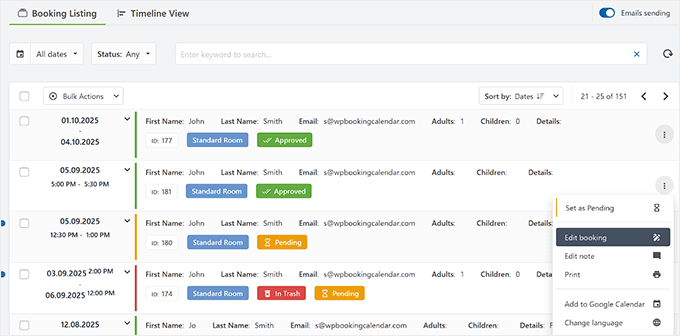
I set up a demo site for a boutique bed and breakfast. Straight away, the plugin’s availability calendar is the star of the show. Instead of a list of times, guests see a visual grid of dates.
I also tested the multi-language support and the iCal integration, which is vital if you’re also listing your property on Airbnb or VRBO. I found that Booking Calendar synced up and blocked off those dates on my WordPress site automatically.
Even better, the notification system worked perfectly, firing off emails the second a reservation was made.
While Booking Calendar’s interface is a bit basic, it’s incredibly stable. Essentially, this is the perfect example of a solid, reliable Calendly alternative that won’t add unnecessary bloat to your WordPress website.
Why I Recommend Booking Calendar: This is the best option for property owners and rental businesses, as it provides a clear calendar that guests can understand immediately.
5. BirchPress – Best for Multi-Staff Service Businesses
| Pros of BirchPress | ✅ Highly customizable, meeting the needs of diverse business models ✅ Eases payment processing with integrated gateways ✅ Strong support for recurring events and repeat appointments ✅ Built-in email reminder system reduces no-shows ✅ Supports multiple staff, with staff member auto-assignment ✅ Offers extensive integration with third-party calendars, reducing double bookings |
| Cons of BirchPress | ❌ No built-in options for syncing with certain niche calendars ❌ Not as streamlined for users who need a straightforward booking system |
| Pricing | Starts at $99 per year. |
| Best For | Service-based businesses with multiple employees who need to manage team schedules in one location. |
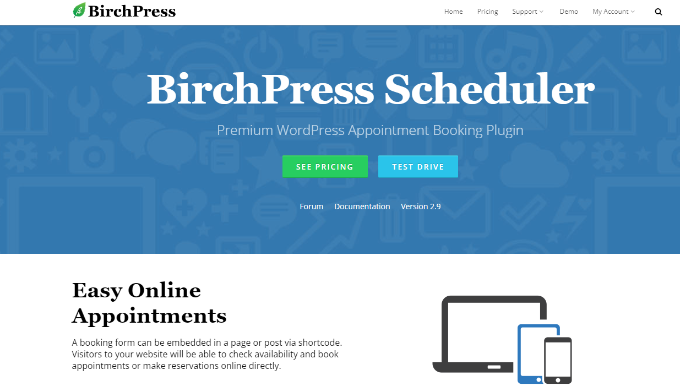
BirchPress is a professional appointment booking and management plugin built for multi-staff businesses. It lets you manage schedules across multiple locations, assign services to specific staff members, and sync everything with major calendars like Outlook and Google.
To put BirchPress to the test, I created a scheduling system for a fictional, multi-staff wellness center. In particular, I like how I could assign staff appointments in different colors, as it made my master schedule easy to read at a glance.
Plus, BirchPress’ staff member auto-assignment works out-of-the-box. When I created a booking without specifying a staff member, BirchPress assigned someone automatically based on availability.
Going further, I set a minimum notice period of 24 hours, so I didn’t get any surprise, last-minute bookings. I was also impressed by BirchPress’ return customer booking feature, as existing clients could log in with their email and password, and then book again without having to re-enter their information.
The plugin also attaches an .ics file to every email reminder. This lets clients add the appointment to their Outlook or Apple Calendar with a single click.
Why I Recommend BirchPress: This is a great choice for multi-staff businesses. It’s the best fit for salons, clinics, or any team-based service business where you need to manage several staff members. It’s especially helpful if those employees all have different working hours and availability.
6. Simplybook.me – Best for Enterprise-Level Businesses
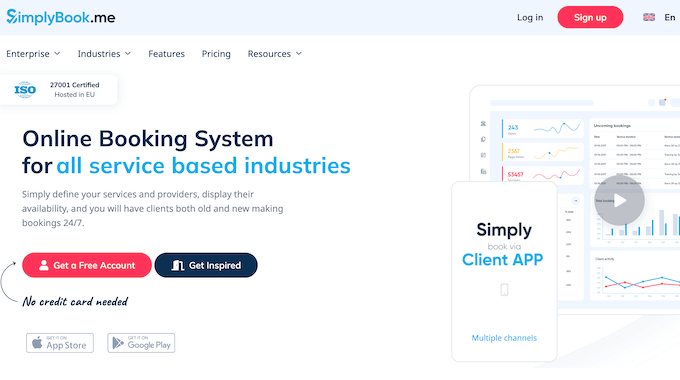
| Pros of Simplybook.me | ✅ Create external booking pages, or integrate Simplybook with your existing website ✅ Scalable solution that grows with your business needs ✅ Mobile app so you can view and manage your bookings on the go ✅ Provides detailed analytics for deeper insights into appointment trends ✅ Built-in AI assistant allows clients to book appointments using natural voice commands ✅ Seamless integration with social media platforms for increased visibility |
| Cons of Simplybook.me | ❌ May be over-engineered for very simple scheduling needs ❌ Limited offline functionality for managing bookings without connectivity |
| Pricing | You can start with the free tier and manage up to 50 bookings per month. After that, the paid plans range from $11.90-$49.90 per month, when billed annually. |
| Best For | Enterprise-level businesses who need a scalable, high-feature system that reaches customers wherever they are online. |
Simplybook.me is a high-end, web-based appointment scheduling platform that also has a dedicated WordPress integration.
Compared to other options in this list, Simplybook’s setup was a bit more involved because you’re connecting to an external account. However, in my opinion the payoff is well worth the initial effort.
With Simplybook, you can accept bookings directly via Facebook, Instagram, Google, or your own branded client app. I was particularly impressed by the mobile app, as clients can download it to their smartphone or tablet and then manage their bookings on the go.
Simplybook’s analytics dashboard is also more detailed than some competing booking solutions. It showed me which services were most popular and what times were my peak booking hours. This level of insight is invaluable when you’re growing your business.
Simplybook even has a built-in AI assistant that can help clients book via voice commands. While it might be over-engineered for a local business, Simplybook is the perfect example of where scheduling is headed for high-growth brands.
Why I Recommend Simplybook.me: This is a powerful option for enterprise-level businesses. While it’s more expensive compared to some competitors, it’s well worth the investment if you need a scalable, high-feature system that works across multiple channels.
7. Easy Appointments – Best Free WordPress Booking Plugin

| Pros of Easy Appointments | ✅ Cost-effective solution, especially for small to medium-sized businesses ✅ Simple interface offers rapid setup and maintenance ✅ Easy to embed and manage through WordPress ✅ Supports multi-location and multi-service scheduling, suitable for diverse business needs ✅ Notification system helps to make sure appointments are remembered and managed efficiently |
| Cons of Easy Appointments | ❌ Interface may be too basic for complex appointment scheduling needs |
| Pricing | You can download Easy Appointments for free from WordPress.org. |
| Best For | Local shops or solo operators who need a functional multi-location system without the high price tag. |
Easy Appointments is a no-frills, highly flexible booking plugin for WordPress. It’s perfect for local businesses that need to manage multiple locations, services, and workers without a high entry cost.
I tested Easy Appointments by setting up a booking system for a small repair shop with three different locations.
Most plugins charge extra for multi-location support, but Easy Appointments let me set up three locations and manage unique schedules for each branch for free.
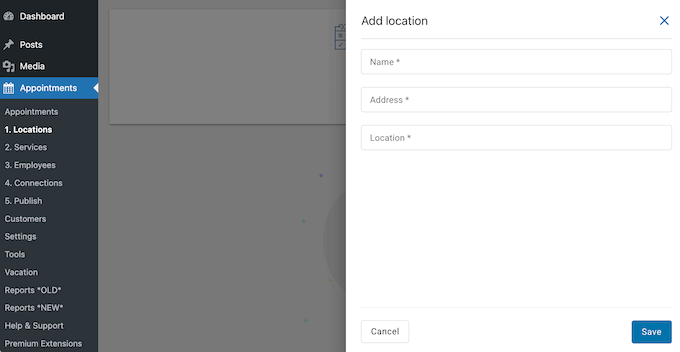
For my booking form, I used Easy Appointments’ two-column layout and enabled Google reCAPTCHA v3. This is a big deal because our readers often complain about spam bookings filling up their calendars. Easy Appointments’ invisible reCAPTCHA promises to stop the bots without annoying real customers.
On mobile, the form remains clear and easy to tap through. For a small business that just needs a way to let people pick a time and location, Easy Appointments performs exactly as advertised.
Why I Recommend Easy Appointments: If you don’t need fancy marketing features and just want a reliable way to accept appointments, then Easy Appointments is a solid choice. I also highly recommend it for budget-conscious local businesses, especially those with multiple locations.
What Is the Best Calendly Alternative for WordPress?
After all my testing, I believe Sugar Calendar Bookings is the best choice for most users. It’s easy for beginners while having all the features that a small business needs to accept bookings and appointments.
However, every website has different needs, so Sugar Calendar may not be the best option for your particular business.
So, here are some other options that I recommend for specific use cases:
- If you’re a freelancer who needs to qualify leads first, WPForms is your best option. I’ve found that many freelancers waste hours on discovery calls with leads who aren’t a good fit. By using conditional logic in WPForms, you can ask the hard questions upfront and then only show your calendar to people who meet your criteria.
- For consultants working across time zones, Simply Schedule Appointments is the gold standard. This plugin is the most reliable way to ensure you never get double-booked while you’re asleep in a different timezone.
- If you’re looking for a free plugin, then Booking Calendar is a solid choice. It lets you manage small equipment rentals and basic room bookings without any upfront investment.
Best Calendly Alternatives for WordPress: FAQs
It is a big decision to choose the right calendar and appointment plugin. After all, it’s essentially the front door to your business – if it breaks, then you stop making money.
To help you make the right choice, I’ve put together all the most frequently asked questions I hear from our readers, so you can get the answers you need, fast.
What is the best free Calendly alternative for WordPress?
If you’re just starting out and need a solid free option, Booking Calendar and Easy Appointments are my top picks.
In my experience, Booking Calendar is the best choice if you need a visual grid where potential customers can see all your dates at a glance. On the other hand, Easy Appointments is a lifesaver for local businesses that need to manage multiple locations without paying for a premium plugin.
Can WordPress booking plugins sync with Google Calendar?
They sure can! Sugar Calendar Bookings, Simply Schedule Appointments, and BirchPress all offer a reliable Google Calendar sync.
This helps you avoid double-bookings that can hurt the customer experience and your brand reputation.
Do I need a separate payment processor for WordPress booking plugins?
No, you don’t need to sign up for a complicated merchant account.
Most of the plugins I recommend integrate directly with Stripe or PayPal, including Sugar Calendar Bookings and WPForms. Simply connect your existing account in the plugin settings, and you can start accepting payments for consultations or classes straight away.
Which WordPress booking plugin is best for multiple staff members?
When it comes to managing a team, BirchPress is my top pick. It lets you assign specific services to particular staff members, and even color-codes their appointments.
BirchPress also supports auto-assignment. This is great for busy clinics or salons where you just want a system that picks the first available staff member.
Are WordPress booking plugins actually better than Calendly?
It depends on your goals, but for most growing businesses the answer is: yes.
A WordPress plugin gives you complete ownership over your data, so your client list isn’t sitting on someone else’s server. Plus, you don’t have to deal with recurring per-user fees that eat into your profits as you hire more people.
Calendly may be fine for a quick one-person setup, but WordPress booking plugins give you a level of control and design freedom that you can’t get elsewhere.
Will these plugins slow down my website?
If you pick a well-coded plugin like Sugar Calendar Bookings, then you won’t notice any impact on your site speed.
I’ve tested all these plugins under heavy loads, and your booking pages should stay incredibly fast – as long as you aren’t using a generic, bloated WordPress theme.
More Resources for Small Businesses
If you’re building a booking system for your WordPress site, these guides will help you connect the right tools and grow your business:
- How I Created a WordPress Contact Form That People Actually Use
- Best WordPress Membership Plugins (Compared)
- How to Build an Email List in WordPress
- Best WordPress CRM Plugins (Compared)
- How to Install Google Analytics in WordPress for Beginners
If you liked this article, then please subscribe to our YouTube Channel for WordPress video tutorials. You can also find us on Twitter and Facebook.
The post 7 Best Calendly Alternatives for WordPress (Based on My Testing) first appeared on WPBeginner.
from WPBeginner https://ift.tt/HpS2LQT
More links is https://mwktutor.com

No comments:
Post a Comment