Thursday, 27 November 2025

WPBeginner Spotlight 18: WPChat, Black Friday Highlights & What’s New in WordPress

November has been a busy month across the WordPress ecosystem, with major product launches, platform updates, and new tools for site owners and developers.

This edition covers everything from live chat assistants and automation integrations to major acquisitions and WordPress community milestones.

Whether you’re running an online store, building digital communities, or managing client sites, there are many new features and updates to explore this month.

Let’s dive into what’s new across WordPress.

WPBeginner spotlight - WordPress news for November 2025

β„Ή️ WPBeginner Spotlight brings you a monthly roundup of the most important WordPress news, product updates, and ecosystem developments.

Have news to share for next month’s edition? Send tips, product launches, or feature updates through our contact form.

WPChat’s Live Chat for WordPress Turns Conversations into Sales

WPChat, a new WordPress chat plugin, has launched as a simple, affordable way for WordPress site owners to chat with visitors instantly.

Unlike expensive live chat tools, WPChat connects your site directly to popular messaging apps so customers can reach you the same way they chat with friends.

WPChat works with WhatsApp, Messenger, Instagram, and Telegram, allowing conversations to continue even after visitors leave your website.
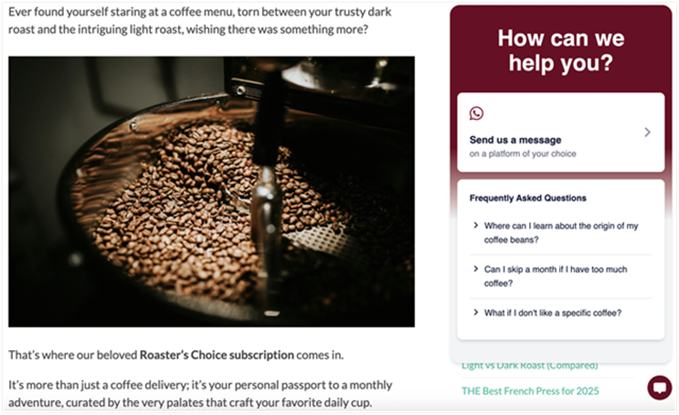
how-wpchat-appears-on-wordpress

This allows you to provide 24/7 support to users, offer better customer service, and respond faster to reduce the number of lost visitors.

Key WPChat features:

  • Chat on WhatsApp, Instagram, Messenger, and Telegram
  • AI-powered FAQs for instant answers
  • Automated chat funnels to boost conversions
  • Customizable assistant and visibility rules
  • Simple annual pricing with no per-chat fees

For more details, see our WPChat announcement with a walkthrough showing how it works.
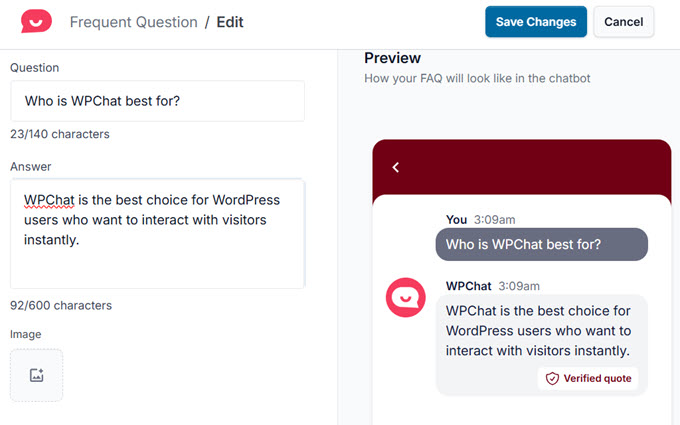
wpchat faqs

Unlike many chat tools that charge per agent or per message, WPChat keeps things simple with affordable annual plans starting at just $49/year.

You can begin with a smaller plan and upgrade as your business grows, without worrying about hidden fees or usage limits. There is also a free version available on WordPress.org.


100+ WordPress Black Friday Deals πŸ›️

WordPress Black Friday Deals

Get the biggest discounts of the year on WordPress plugins, themes, hosting, and tools.

Perfect for upgrading your site, saving on renewals, or launching new projects. Don’t miss these limited-time Black Friday and Cyber Monday savings.


WPForms Adds n8n Integration for Powerful No-Code Automations

WPForms has introduced a new n8n integration that helps WordPress users automate manual tasks that often follow form submissions.

Instead of copying data or sending follow-up emails yourself, n8n lets you connect WPForms to hundreds of apps and run automated workflows with just a few clicks.
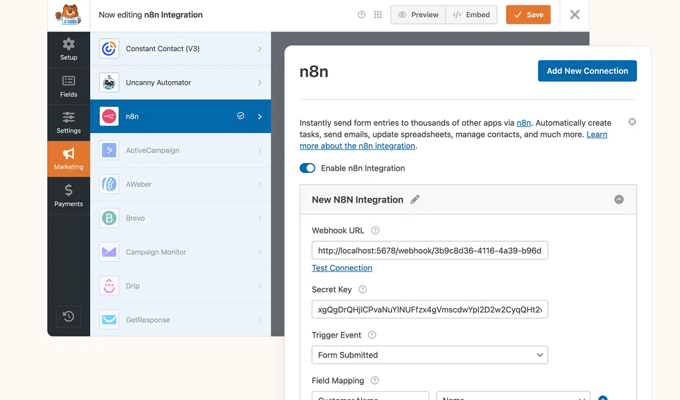
WPForms n8n integration

The integration supports over 500 tools, including Trello, Asana, ClickUp, Slack, and Jira. You can also add AI steps using services like ChatGPT or Claude to analyze form submissions or generate personalized responses.

Key use cases for the n8n addon:

  • Send personalized emails automatically after form submissions.
  • Add leads to your CRM and notify your team on Slack.
  • Use AI to analyze responses or create summaries.
  • Update spreadsheets, calendars, or project boards instantly.
  • Build multi-step workflows that run on autopilot.
  • Supports 500+ integrations and AI services.
  • Ideal for small businesses, marketers, service providers, and creators.

WPForms users with self-hosted n8n instances can start creating automations today by following the official setup guide.

MemberPress Launches ClubSuite Communities to Bring Private Groups Into WordPress

The best WordPress membership plugin, MemberPress, has introduced ClubSuite, a new set of add-ons that bring social features directly into membership sites.

It comes with two powerful addons called ClubDirectory and ClubCircles.

ClubDirectory allows members to create rich profiles and browse member directories based on role, membership level, or location.

On the other hand, ClubCircles adds private, member-only forums where users can post updates, share wins, ask questions, and collaborate in a well-moderated environment.

These add-ons turn a simple membership list into a more connected network. They also give site owners new ways to increase retention, add value, and create premium tiers with exclusive access to directories or communities.

Overall, these tools help members connect more easily, which often increases engagement and reduces churn.

ClubSuite™ is now available to MemberPress users who want to build a more interactive, community-driven membership experience.

Adobe’s Semrush Acquisition Sparks Interest in Affordable SEO Alternatives

Adobe’s plan to acquire Semrush for $1.9 billion has raised questions for small businesses that depend on SEO tools without prohibitively high price tags.

With large platforms consolidating and potential changes ahead, many WordPress users are already exploring more affordable options.

Several leaders in the WordPress community pointed out that SEO tools built specifically for WordPress remain cost-effective and easy to use, offering strong alternatives without enterprise-level costs or feature bloat.

Best Semrush Alternatives for Bloggers

As AI-driven search continues to reshape the SEO landscape, more site owners are choosing lightweight, budget-friendly tools that integrate seamlessly with WordPress.

Here are just a few Semrush alternatives to consider:

  • All in One SEO (AIOSEO) – Includes built-in keyword rank tracking, AI writing and image generation, LLMs.txt support, modular pricing, and powerful on-page optimization tools.
  • SEOBoost – An AI writing assistant that helps generate optimized content at a lower cost than major enterprise platforms.
  • LowFruits – Helps users perform keyword research and find low-competition keywords for a fraction of the price.

WPConsent Reaches 100,000 Installs and Earns IAB-TCF Certification

WPConsent, the popular privacy compliance plugin for WordPress, has surpassed 100,000 active installations on WordPress.org.
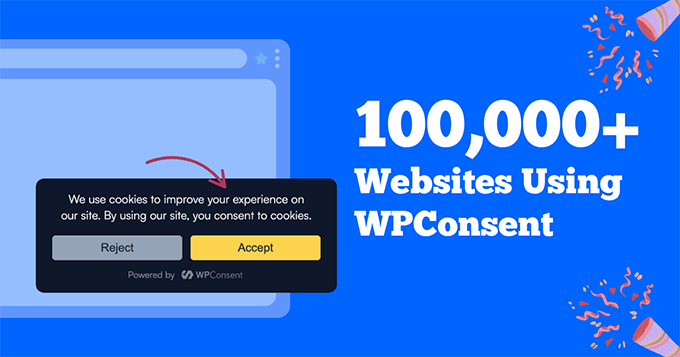
WPConsent Milestone

With this growing popularity, WPConsent is becoming a trusted and cost-effective privacy solution for WordPress users who need simple, accurate compliance tools.

It also recently achieved IAB-TCF certification, making it more useful for publishers and advertisers who must meet strict consent standards.

The IAB-TCF is an industry standard for managing and transmitting user consent for advertising and privacy compliance worldwide.

Overall, the plugin continues to gain attention for providing advanced privacy capabilities at an affordable price.

Other recent updates include integrations with Google Consent Mode v2, Microsoft Clarity Consent Mode v2, and Global Privacy Control.

All of these integrations make it easier for site owners to stay compliant with evolving tracking and privacy requirements, without needing technical knowledge.

BuddyBoss Introduces BuddyBoss Plus With Native Gamification and Media Offloading

BuddyBoss has launched BuddyBoss Plus, a new plan that adds native Gamification and Offload Media features to the online community platform. These new features are designed to help growing communities scale without relying on additional plugins.

Both features are built directly into the platform to avoid compatibility issues or slowing down the website.

BuddyBoss Plus

Gamification rewards meaningful member engagement. Meanwhile, Offload Media integrates with Cloudflare to automatically move images, videos, and documents off the server for faster performance.

Two new features are also in development: Member Blogging for front-end post creation and Gamification Competitions for engagement challenges.

BuddyBoss Plus is now available for new and existing customers who want a more streamlined and scalable community platform.

Duplicator Introduces Duplicator Cloud for Built-In Off-Site Backups

Duplicator, the popular WordPress backup and migration plugin, has launched Duplicator Cloud, a new built-in storage system.

It allows users to back up their WordPress sites without relying on external services like Google Drive, Dropbox, or Amazon S3. Off-site backups can now be managed entirely inside the Duplicator ecosystem.

This is a big advantage because it allows site owners to manage everything from WordPress without having to juggle multiple platforms and API keys.
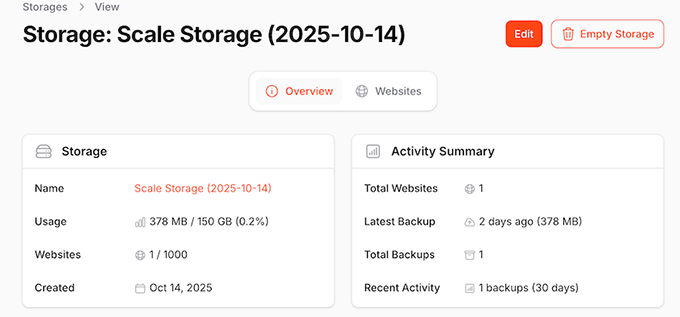
Duplicator cloud storage

The update also includes a detailed cloud dashboard that displays storage usage, activity logs, and per-site backup information. These features help users monitor backup behavior and troubleshoot issues more easily.

Storage plans range from 2GB to 150GB, so users can choose the amount of space that fits their site or client workload.
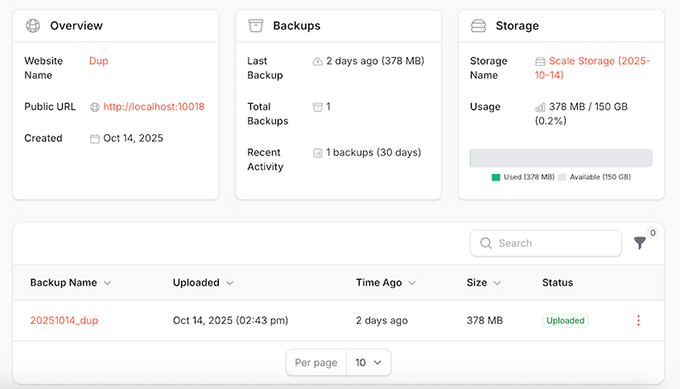
Duplicator cloud backup management

Duplicator Cloud is available now in the latest version of Duplicator Pro. It can be enabled by selecting a cloud storage plan from your Duplicator account.

Charitable Adds Donor Leaderboard to Boost Fundraising Engagement

The popular WordPress donation and fundraising plugin, Charitable, has introduced a new Donor Leaderboard feature in Charitable Pro.

It’s designed to highlight top supporters and add a light gamification element to fundraising campaigns. This leaderboard publicly recognizes donors and helps increase total donations by creating friendly competition.
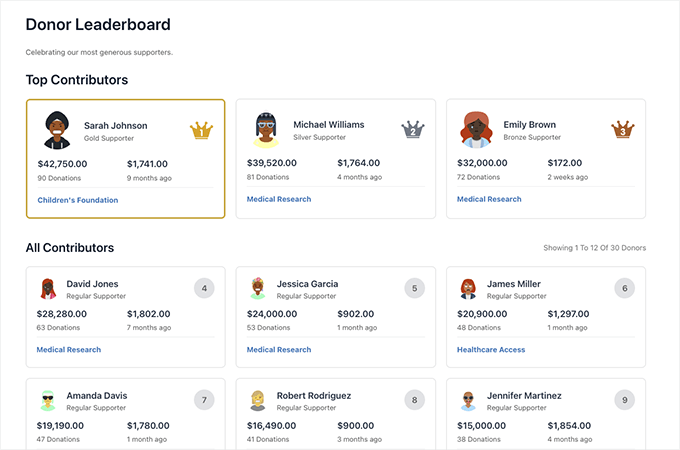
Dono leaderboard

The feature includes two layouts, list view and card view, and can be added to any page using the block editor, campaign builder, or a shortcode.

These display options allow organizations to show donation amounts, avatars, rankings, or time-based results.
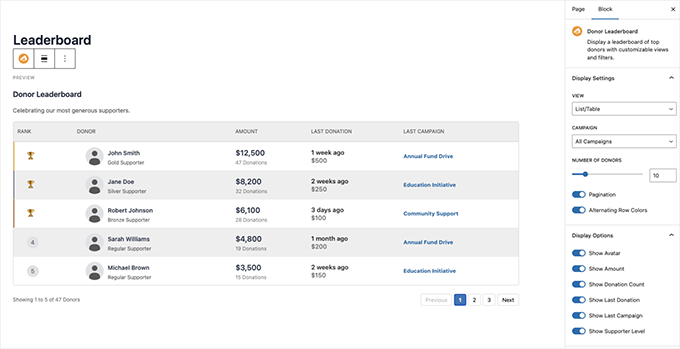
Display donor leaderboard anywhere

The leaderboard works with Recurring Donations and Charitable Ambassadors, supporting lifetime totals and team-based leaderboards.

The donor dashboard is now available with Charitable Pro.

SearchWP Launches WPFilters for Better On-Site Content Filtering

SearchWP has released WPFilters, a new plugin that adds customizable filtering tools to help visitors quickly sort through posts, products, and listings.

The plugin extends WordPress’ default structure by providing filters for categories, tags, custom fields, WooCommerce attributes, and more.

This improves the user experience and helps visitors find relevant content faster.
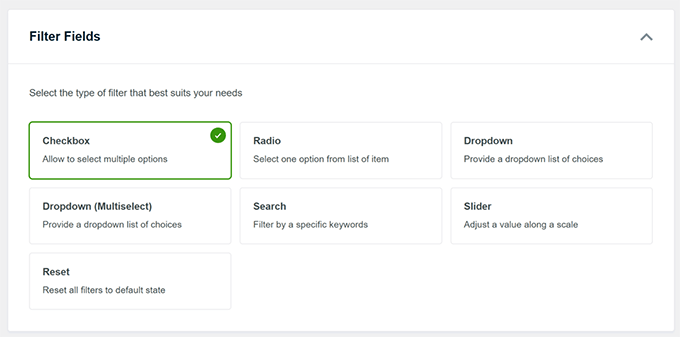
Select filters to add

WPFilters supports multiple filter types—such as checkboxes, dropdowns, radio buttons, and keyword filters—and includes an onboarding wizard for easy setup. Plus, filters can be added anywhere on a site using a block, shortcode, or PHP snippet.

WPFilters is now available to help users build better filtering experiences across WordPress sites and make their content easier to find.

SaveTo Wishlist Adds Simple, Fast Wishlists for WooCommerce Stores

SaveTo Wishlist has launched as a lightweight wishlist solution for WooCommerce.

This gives shoppers an easy way to save products in online stores and return when they’re ready to buy.
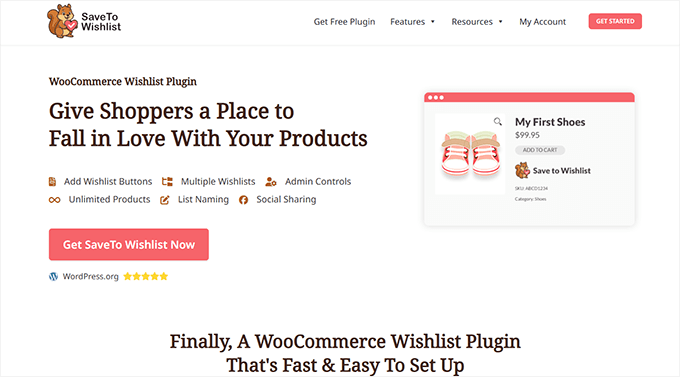
Saveto Wishlist

The plugin supports multiple wishlists, custom naming, and unlimited items, helping stores capture more buying intent.

It works with all WooCommerce themes, includes shareable public links, and is fully translation-ready. Store owners can set it up quickly, and customers can organize products into as many lists as they like.

SaveTo Wishlist is a premium plugin available for download. There is also a free version available with limited features.

Easy Digital Downloads Adds Klarna for Flexible “Buy Now, Pay Later” Payments

Easy Digital Downloads has introduced Klarna support through its built-in Stripe integration. This gives customers the option to pay now, pay later, or split their purchase into interest-free installments.

This can boost overall conversions, reduce cart abandonment, and increase sales of products with higher price tags.

Klarna appears automatically at checkout for eligible customers based on location and order value. Stripe manages the entire experience, offering a fast and secure way for shoppers to complete their purchase.
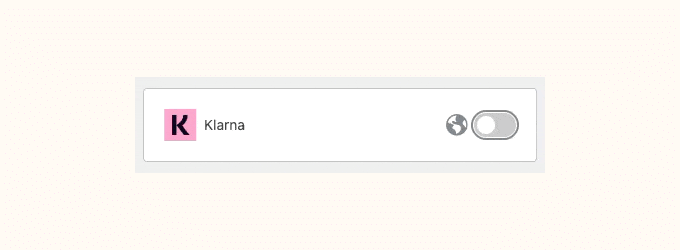
EDD Klarna support

You can enable Klarna now in Easy Digital Downloads 3.6.1 under the Stripe payment settings.

In Other News πŸ—ž️

  • MonsterInsights has added block-based conversion tracking and automatic Site Notes syncing. These updates make it easier for site owners to mark important events directly inside Google Analytics and understand which changes impact performance.
  • WordPress 6.9 Release Candidate 3 is now available, with the final release expected on December 2. If you’re wondering which changes are coming, check out our full guide: What’s coming in WordPress 6.9.
  • State of the Word is around the corner, bringing annual updates on the future of WordPress, Gutenberg, and the open-source ecosystem.

OptinMonster – Convert Visitors into Subscribers & Customers

OptinMonster Mascot

OptinMonster helps you grow your email list and boost conversions with powerful popups, slide-ins, and on-site campaigns. Use smart triggers and a no-code builder to display the right message to the right visitor at the right time.

  • Smash Balloon has added video filters to its Facebook Feed plugin. This allows users to display only video content for better engagement and a more focused feed experience.
  • WooCommerce has announced “Reddit for WooCommerce,” a tool designed to help merchants reach new shoppers by promoting products inside Reddit communities.
  • WPBeginner has exited its investment in Seahawk Media, and the WPBeginner Pro Services program will be discontinued. This move allows the team to refocus on producing free tutorials and expanding software tools for the WordPress community.
  • AdTribes now supports OpenAI product feeds, allowing WooCommerce stores to appear in AI-driven shopping experiences such as ChatGPT product searches and recommendations.

All in One SEO – AI-Powered SEO Tools for Higher Rankings

All in One SEO - Logo and Icon

All in One SEO (AIOSEO) brings next-generation AI features to WordPress. Create optimized titles and descriptions with AI writing, generate SEO-ready images with AI, and add search-friendly context using the built-in LLMs.txt generator.

AIOSEO also handles advanced schema markup to help search engines understand your content and boost visibility.

  • WPCode now supports multiple Facebook Pixels on the same site through its Conversion Pixels addon — a major upgrade for agencies and advanced advertisers.
  • WP Simple Pay has added support for new local payment methods, including MobilePay, BECS Direct Debit, PromptPay, and WeChat Pay, to improve global checkout experiences.
  • Formidable Forms has redesigned their email notification templates to help users send more polished and professional messages from their forms.
  • WooCommerce is calling for testers for the new MCP beta, part of their upcoming merchant tools and checkout improvements.

New Plugins & Tools

  • WPChat [πŸ”₯New] – A smart live chat assistant designed to improve conversions and connect with your visitors.
  • Sugar Calendar Bookings – Adds booking and scheduling features to the Sugar Calendar plugin.
  • SeedProd AI – AI-powered site builder allows you to simply describe your site in plain text to generate a complete website in less than 60 seconds.
  • RewardsWP – A plugin that adds rewards, points, and loyalty systems to WordPress sites.
  • Internet Archive Wayback Machine Link Fixer – Automatically repairs broken links by checking the Wayback Machine for archived versions.
  • Password Less Login – A new plugin that lets users log into WordPress without a password using secure magic links.

That wraps up this month’s WPBeginner Spotlight! Thanks for following along with the latest updates across the WordPress ecosystem.

If you have a product launch or feature update you’d like us to feature in the next edition, feel free to send us a message.

See you next month with more WordPress news and insights!

The post WPBeginner Spotlight 18: WPChat, Black Friday Highlights & What’s New in WordPress first appeared on WPBeginner.


from WPBeginner https://ift.tt/AhBrDU1
More links is https://mwktutor.com

Wednesday, 26 November 2025

14 Ways I Get More Donations for My Nonprofit (I’ll Show You How)

A while ago, I built a nonprofit website that looked great and quickly started getting good traffic. But even with lots of visitors, donations weren’t coming in like I hoped.

After some research, I realized the problem: I had designed the site thinking like a developer, not a donor. Once I understood this, I knew I had to act quickly.

So I added a bright “Give Hope” button at the top, simplified the donation form so it was easy to fill out, and put our success stories right on the homepage.

Almost immediately, donations began to rise as people could finally connect with our cause and give without confusion.

Since then, I’ve helped many nonprofits increase their online donations with simple changes that actually work.

In this guide, I’m sharing 14 practical ways to get more donations, including the exact steps that turned my struggling donation page into a fundraising success. πŸš€

Note: This is a guest post by David Bisset, Product Manager at Charitable, the best WordPress donation plugin. This is an expert column where we invite a WordPress expert to share their experiences with our readers.

Ways I Get More Donations For My Nonprofit

πŸ’‘Quick Glance: The Top 10 Donation Strategies for Nonprofits

Here’s a summary table of the top 10 foundational strategies I use to increase donations, along with why they work:

🎯 Strategy ✅ Why It Works
Simplify Donation Forms Fewer fields mean more people complete donations
Suggested Donation Amounts Guide donors toward higher, predictable gifts
Use Thank-You Emails Build trust and encourages repeat giving
Add Recurring Donations Turn one-time donors into long-term supporters
Show a Progress Bar Create urgency and community motivation
Story-Driven Campaign Pages Emotional stories inspire action
Peer-to-Peer Fundraising Let supporters fundraise on your behalf
Corporate Matching Gifts Double the impact without asking donors for more
Social Sharing Buttons Increase reach through donors’ own networks
Segment Donor Emails Personalized appeals get higher responses
πŸ‘‰ Fundraising Terms Made Simple

Before I dive into why traditional fundraising underperforms, let’s quickly go over a few terms you’ll see in this guide.

If you’re new to online fundraising, these will help you follow along more easily. If you already know them, feel free to skip ahead.

  • Conversion Rate: The percentage of people who complete a desired action, such as filling out your donation form. If 100 people visit the form and 10 donate, your conversion rate is 10%.
  • Donor Lifetime Value (LTV): The total amount of money a donor gives over the entire time they stay connected with your nonprofit. For example, a $20 monthly donor gives $240 in one year, which is often more than a one-time $100 gift.
  • Donor Retention: The percentage of donors who continue giving after their first gift. High retention means donors keep supporting you year after year, making your fundraising more stable.
Why Your Nonprofit Needs New Ways to Get More Donations

Traditional fundraising methods like galas, phone banks, and paper checks aren’t bad, but they don’t work as well as they used to.

They slow things down, limit your reach, and make it harder to keep donors coming back. Here are some of the biggest reasons why they fall short today:

1. Limited Reach and High Effort

Events and phone banks only reach a small group of people. Online fundraising, on the other hand, is open 24/7 and can reach supporters anywhere in the world.

According to research, nonprofits raise an average of $78 for every 1,000 fundraising emails sent. That may sound small, but the big advantage is scale—you can reach far more people online than at a single event.

2. More Friction, Fewer Donations

Every extra step means fewer donations. Writing and mailing a paper check takes effort, and people often give up. On the other hand, online giving makes it easy: a few clicks, and the gift is done.

This is why conversion rates are usually much higher online.

3. One-Time Gifts vs. Recurring Support

Offline methods often lead to one-time donations. Online, you can encourage monthly giving with simple checkboxes or subscription options.

A $20 monthly donor gives $240 a year—much more than a one-time $100 gift. That’s the power of donor lifetime value.

4. Psychology That Boosts Giving

Traditional methods don’t give you much room to experiment. Online, you can use:

  • Social proof → showing how many people already donated.
  • Urgency → adding deadlines like “only 2 days left to meet our goal.”
  • Anchoring → suggesting preset amounts like $25, $50, $100.

These simple psychological nudges make a big difference.

5. Keeping Donors Coming Back

Events and phone calls are one-and-done. Online fundraising makes donor retention easier with automated thank-you emails, updates about impact, and reminders to give again.

The truth is that traditional fundraising just can’t keep up with how people give today. Donors expect convenience, transparency, and the option to give anytime, anywhere.

Now, let’s take a look at 14 online donation strategies to help you raise money and build stronger relationships with your supporters.

Here is a quick overview if you want to jump down to a specific tip:

Essential Donation Strategies Every Nonprofit Should Use

I’ve tested a lot of different approaches in my own nonprofit projects, and these 7 strategies made the biggest difference. They’re not complicated or expensive, but they can completely change how people respond to your donation requests.

Think of them as the foundation every nonprofit should have in place before trying anything more advanced.

1. Keep Donation Forms Simple and Distraction-Free

Nobody likes filling out a long form. If your donation page asks for too much information, people will get frustrated and leave before completing it.

In fact, long forms are one of the main reasons that donors give up halfway.

The fix is simple: only ask for what you really need. I usually recommend keeping it to name, email, donation amount, and payment information.

Skip the extra fields like fax numbers or long mailing addresses if you don’t really need them. And don’t clutter the page with popups or menus that pull people away.

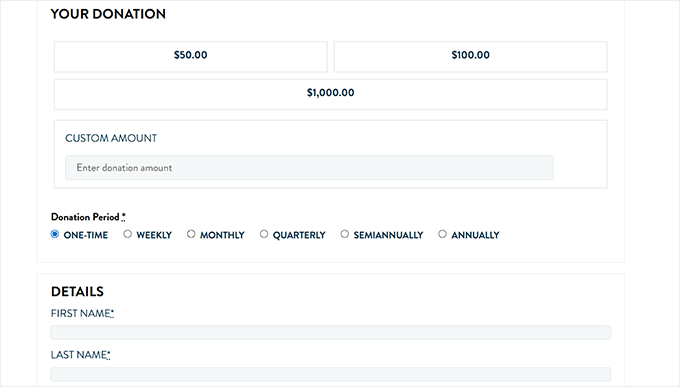
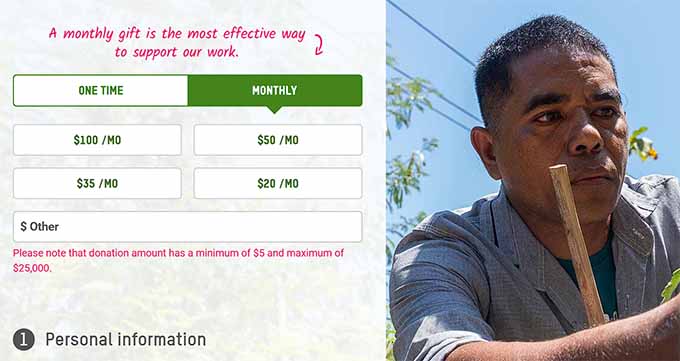
The Balkhi Foundation’s donation page is a great example of this. Their form asks for the donation amount, lets you choose whether it’s one-time or monthly, and then collects just the essentials—name, email, and address.

Donation page on Balkhi Foundation website

It’s quick, straightforward, and easy to finish. That’s exactly the kind of form that keeps donors moving all the way to the ‘Donate’ button.

2. Offer Suggested Donation Amounts

One of the easiest ways to boost donations is by giving people suggested amounts.

This works because of anchoring psychology: when someone sees set numbers like $25, $50, or $100, it helps them quickly decide how much to give, rather than overthinking it.

Most successful nonprofits already use this tactic because it guides donors without pressuring them. Here’s what it might look like:

Cause Suggested Levels
Disaster Relief $25, $50, $100, $250
Education Fund $10, $25, $75, $150
Animal Shelter $15, $30, $60, $120

You can still leave an ‘Other’ box for people who want to enter their own number. But these presets often lead to higher and faster donations because you’ve removed the guesswork.

The best way I’ve found to set this up on a nonprofit site is with Charitable. It’s the best WordPress donation plugin that I use myself.

Charitable comes with premade fundraising templates, and almost all of them already include suggested donation amounts.

Here’s how it works: once your nonprofit site is set up with WordPress and Charitable, just open a template that fits your cause in Charitable’s form builder.

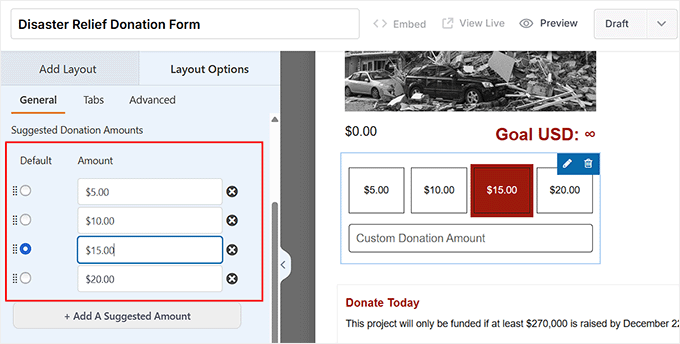
Then, add the built-in ‘Donation Amount’ field, and open its settings in the left column.

You can now type in the tiers you want (like $25, $50, $100) and even pick which option should be the default.

πŸ‘‰ Pro tip: I usually make the middle option the default because people naturally gravitate toward it. For example, if you set $25, $50, and $100, most donors will land on $50 without overthinking.

Configure suggested donation amounts in Charitable

Once you are done, just click the ‘Save’ button to store your settings.

3. Add Recurring Donations

If you could only pick one strategy from this list, this is the one I recommend.

Recurring donations are a total game-changer for nonprofits. Instead of relying on one-time gifts, monthly contributions give your organization a predictable, stable income that makes planning and growing programs much easier.

Over time, recurring donors give 3–5 times as much as one-time donors, making them invaluable for long-term success.

Preview of recurring donation on a nonprofit site

With Charitable, setting up recurring donations is simple.

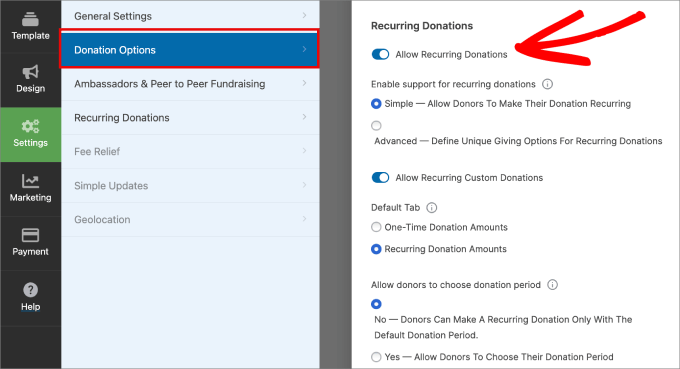
First, you’ll need the ‘Recurring Donations’ addon. Once that’s activated, open your donation form in the editor interface and switch to the ‘Donation Options’ tab.

Here, you have to toggle the ‘Recurring Donation Amounts’ switch to active.

allow recurring donations in Charitable

After that, scroll down the page. You’ll see options to customize the default period and select how often donors should be billed.

Charitable lets you choose from weekly, monthly, quarterly, semiannual, or yearly periods.

donation period charitable

What’s best depends on your cause, but for most nonprofits, setting donation periods of at least 1 month works well.

If you need step-by-step instructions, then check out this article on how to create a recurring donation form in WordPress.

4. Create Campaign Pages That Tell a Story

Think about the last time you gave to a cause. Chances are, it wasn’t the numbers that moved you—it was the story.

That’s exactly what your campaign page needs to spark action.

A strong story usually follows a formula: Problem → Impact → Solution → Call-to-Action.

  1. Problem: Show the challenge your cause is tackling. Keep it short and relatable.
  2. Impact: Share the consequences of the problem or how past support has already made a difference.
  3. Solution: Explain what your nonprofit is doing right now and how donations directly help.
  4. Call-to-Action: End with a strong, clear Donate Now button.

For example, the UNFPA’s maternal health campaign page shows how powerful storytelling can be. The page begins with the problem: mothers in crisis zones lacking safe deliveries.

It then highlights the impact of past support, explains the solution (emergency maternal health kits and trained midwives), and shows a clear ‘Donate Now’ button on the page.

The mix of real photos and stories makes the appeal feel urgent and personal.

UNFPA nonprofit site preview

You can do the same on your site using SeedProd, which is the best WordPress landing page builder.

I used it to build a campaign page for my own nonprofit, and it was surprisingly easy thanks to its pre-made templates and drag-and-drop editor.

To get started with the process, follow our tutorial on how to create a landing page in WordPress.

πŸ’‘Checklist for a Compelling Campaign Page

Here are some tips that can help you create an impactful campaign page:

  • A clear headline that explains the cause.
  • Compelling images or video.
  • A donor story or testimonial.
  • Transparent use of funds (where donations go).
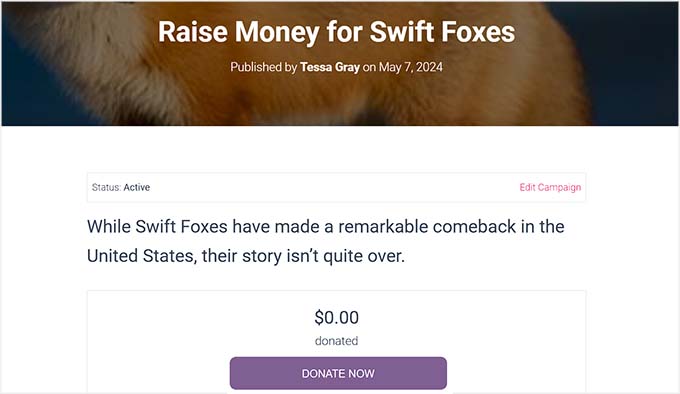
  • A bold Donate Now button above the fold.
5. Display a Fundraising Goal Progress Bar

Donors don’t just want to give money — they want to see the difference their gift is making. That’s where a progress bar / fundraising thermometer comes in.

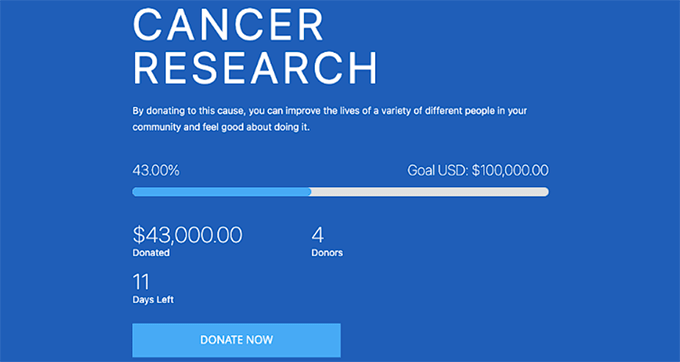
It turns your campaign into a shared mission, showing exactly how close you are to reaching your goal. When people see that their $25 could be the push that takes you from 85% to 90%, they’re much more likely to donate.

Preview of a progress bar

Charitable makes it super easy to add a progress bar.

All you have to do is open the drag-and-drop editor and add the ‘Progress Bar’ field to your donation form. Then click on it to open the field settings in the left column, where you can set your fundraising goal.

The bar will automatically update to show how much has been donated and how close you are to reaching it.

Add a progress bar with Charitable

For the best results, I recommend placing the progress bar where it’s impossible to miss, such as above the form or directly under the donate button.

And don’t forget to highlight it once your campaign hits about 70–90% of the target. You can do this by:

  • Updating your campaign description to say something like “We’re almost there — just $500 to go!”
  • Sharing screenshots of the progress bar in your emails or social media posts.
  • Adding a short banner message above the form, like “Help us cross the finish line today!”

This small push can make a huge difference because donors feel like their gift is the one that will help you reach the goal.

6. Accept Multiple Payment Options

One of the fastest ways to lose a donation is by not offering someone’s preferred way to pay.

Imagine a donor is ready to give, but you only accept checks or one card type. Chances are, they’ll abandon the form and never come back.

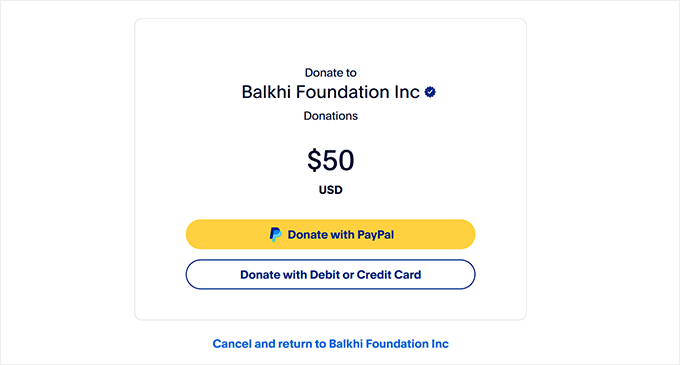
That’s why it’s important to give people choices. I recommend enabling both PayPal and Stripe for starters so that donors can pay using credit cards, debit cards, or their PayPal accounts.

Preview of Balkhi Foundation offering multiple payment options

πŸ‘‰ For detailed instructions, see how to add a PayPal donate button in WordPress and how to set up Stripe donations.

7. Send Automatic Thank-You Emails

Nothing builds donor loyalty like a quick, personal thank-you. When someone donates and immediately receives a message showing their gift mattered, they feel appreciated and are much more likely to give again.

Charitable allows you to turn every donation receipt into a personalized “Thank You” email.

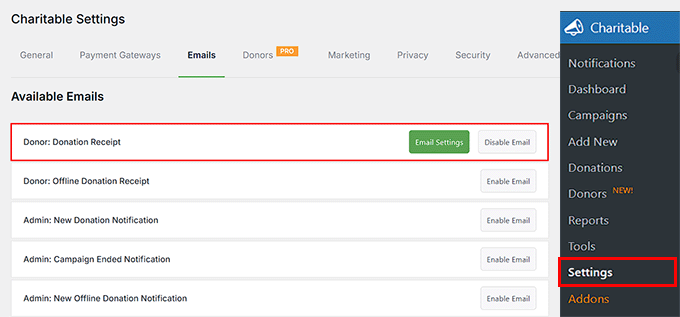
To do this, just visit the Charitable » Settings » Emails page and find the ‘Donor: Donation Receipt’ option. Go ahead and click the ‘Enable Email’ button.

Once you do that, the page will reload. Now, you have to click the ‘Email Settings’ button.

Click Email Settings button in Charitable

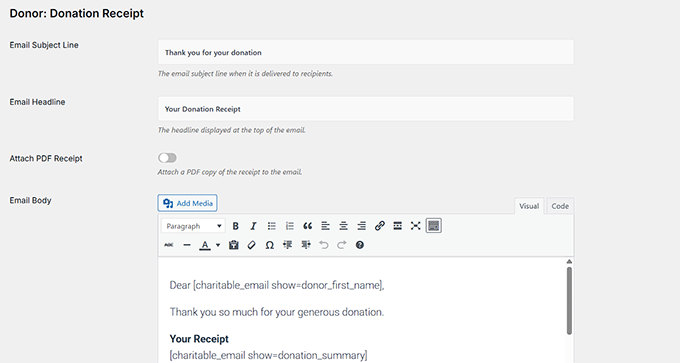
This opens a page where you can add a subject line and email headline, attach a PDF receipt, and write your email body.

You can also use dynamic tags such as {first_name}, {donation_amount}, or {donation_summary} to personalize the thank-you message for each donor.

Upon making your changes, simply click the ‘Save Changes’ button to store your settings.

Configure donation Thank you email in Charitable

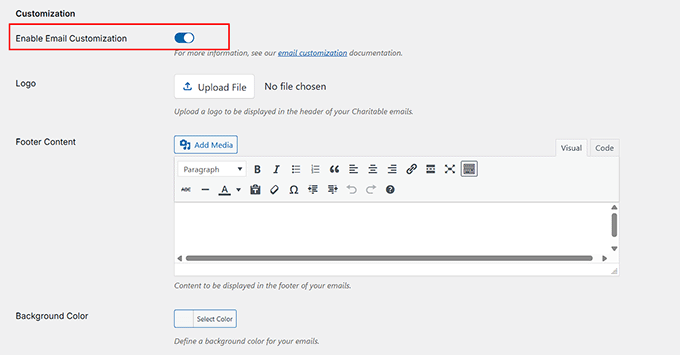
Next, go back to the Emails page and toggle the ‘Enable Email Customization’ switch.

Here, you can upload your logo, add footer content, and adjust background colors to match your nonprofit’s branding.

Customize your emails with Charitable

Donors love instant acknowledgment, and it turns one-time supporters into long-term contributors with minimal effort.

πŸ’‘Pro Tip: To make your thank-you emails more effective:

  • Personalize: Include the donor’s name in the greeting.
  • Show impact: Explain how their donation is being used.
  • Encourage engagement: Add a link to share your campaign or join another cause.

With these steps, your thank-you emails do more than just say thanks — they strengthen relationships, inspire repeat donations, and grow your supporter network.

Marketing and Engagement Strategies for Nonprofits

Raising money is just one part of running a successful nonprofit. To really grow your impact, you need to get the word out, engage your supporters, and keep people excited about your mission.

In this section, I’m sharing 7 practical marketing and engagement strategies that I recommend for nonprofits.

These tips help you connect with more people, build stronger relationships, and encourage supporters to give again and again.

8. Share Campaign Updates With Donors

Donors love to see how their gifts are making a difference. Sharing regular campaign updates helps build trust, keeps supporters excited, and encourages them to give again.

By showing your progress, you make donors feel like they’re part of something bigger, and that’s motivating.

You can keep your donors in the loop using social media, email, and blog posts. Share photos or short videos on your social channels that showcase recent campaign activity, such as a community project in action.

You can also send email newsletters to highlight milestones, donor shout-outs, or short stories about how contributions are being used.

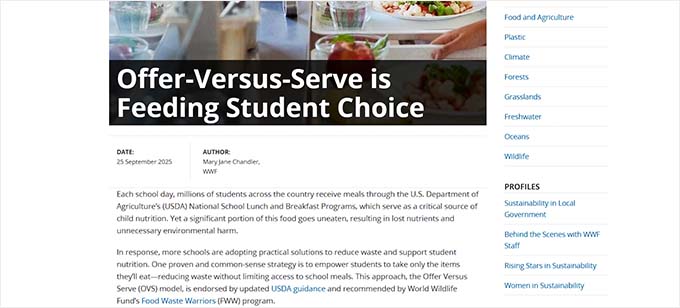
Alternatively, a blog is perfect for a more detailed story with numbers, photos, and testimonials that show how donations are making a real impact.

A blogpost on a nonprofit site

Here’s a clear schedule I recommend for sharing campaign updates with donors:

  • Social media: Post updates 1–2 times per week with photos or short videos. Highlight progress, behind-the-scenes moments, or stories of people your nonprofit is helping.
  • Email newsletter: Send updates 2–4 times per month. Include a short summary of recent achievements, donor shout-outs, and a link to your donation page or campaign.
  • Blog posts: Publish 1–2 in-depth stories per quarter. Include numbers, photos, and testimonials to show long-term impact.
  • Optional: Tag donors or supporters in posts and emails where appropriate. This builds community and makes people feel appreciated.

When people see their donations at work, they’re more likely to stay involved and even spread the word about your cause.

πŸ’‘Pro Tip: Sharing your nonprofit’s story through larger social media campaigns is also a great way to reach new donors and inspire more giving.

At Charitable, we’ve recently started helping nonprofits take part in our Giving Tuesday campaign. You can share your stories with us, and we’ll feature them in our big event on YouTube, TikTok, Instagram, and LinkedIn.

If you’re interested, just fill out the form — we’d love to help highlight your cause and connect you with more supporters.

9. Enable Peer-to-Peer Fundraising

Peer-to-peer fundraising is a great way to let your supporters help you raise money. Your volunteers, donors, or fans can create their own mini-campaigns and share them with friends and family.

This not only brings in new donors but also gets your existing supporters more involved.

I usually recommend this for nonprofits with strong communities, like schools, animal shelters, or local health organizations.

Peer to Peer fundraising preview

With the Charitable Ambassadors addon, it’s super easy to get started. You can offer premade campaign starter templates, so volunteers don’t have to design anything from scratch.

Once someone signs up as an ambassador, they can personalize their page, share it, and start fundraising right away.

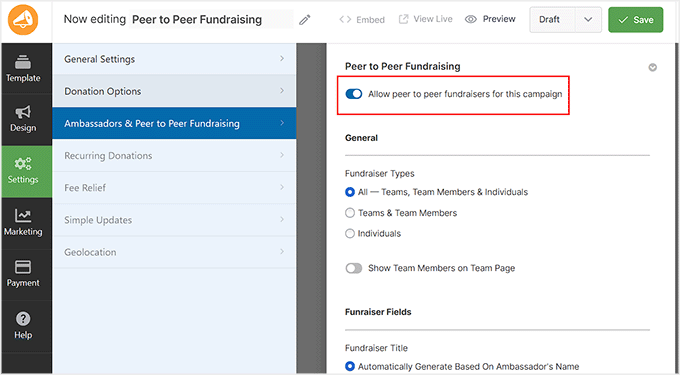
Toggle the Peer to Peer fundraising switch

This setup has personally helped me grow, reach, and attract new supporters who might never have donated otherwise. It’s also motivating for volunteers because they can see exactly how their efforts make a difference.

For more details, you may want to check out our article on how to create peer-to-peer fundraising in WordPress.

10. Run Urgent or Time-Sensitive Campaigns

Creating a sense of urgency can get people to act faster. When donors see that a campaign is ending soon or that their support is needed immediately, they’re more likely to give.

This works really well for nonprofits running relief drives, holiday campaigns, or limited-time matching donations.

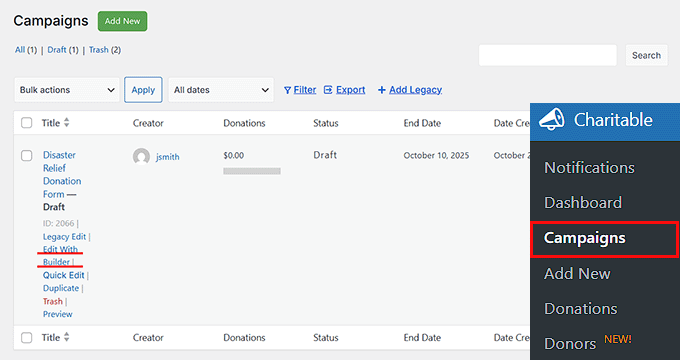
With Charitable, you can set an end date for your campaign using its visual builder. To set it up, go to your campaign page and click the ‘Edit With Builder’ link under your donation form.

Click Edit With Builder link in Charitable

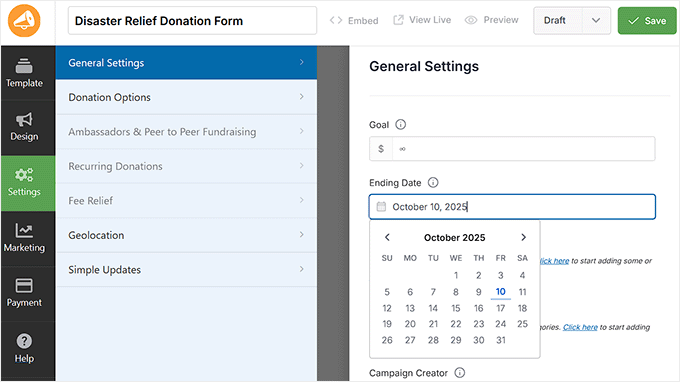
Once the drag and drop builder opens up, switch to the ‘Settings’ tab from the left column.

Here, you can choose the exact date when the campaign should end using the ‘Ending Date’ field.

Add an end date for the donation form in Charitable

Your donation form will now show that the campaign is time-sensitive. This simple addition helps motivate donors to give sooner rather than later.

11. Match Donations With Corporate Sponsors

Corporate matching gifts is a simple way to make every donation go further. Many companies will match donations made by their employees or customers, effectively doubling the impact.

This works especially well for nonprofits with strong community support or local networks.

For example, if a donor gives $50 and their employer matches, your nonprofit instantly receives $100.

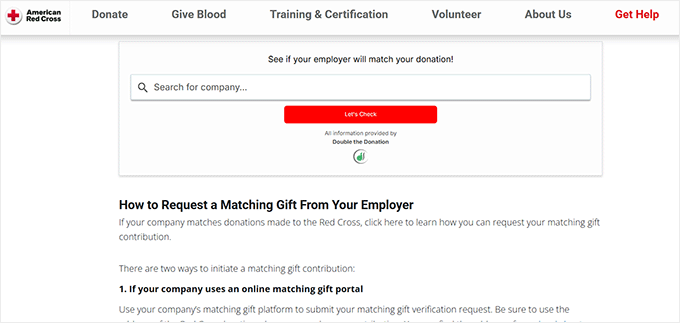
I’ve seen this in action with organizations like the American Red Cross, which often partners with big companies during disaster relief campaigns.

Gift matching preview with American Red Cross

When a business pledges to match donations, it encourages more people to give right away because they know their contribution will be doubled.

To do the same for your nonprofit site, I recommend reaching out to local businesses or companies that align with your mission. Explain how matching works and its benefits: it increases donor engagement and provides the company with good visibility in the community.

Once you secure a match, keep track of all donations carefully, so both the donor and company can be appropriately recognized.

This will help build stronger long-term partnerships with businesses and keep donors excited to give, knowing their impact is being maximized.

12. Use Social Sharing Buttons

A big part of fundraising success comes from word of mouth. When donors share your campaign on Facebook, Twitter, or WhatsApp, it can bring in extra donations that you might never reach on your own.

In fact, many nonprofits see a good chunk of donations coming from social referrals.

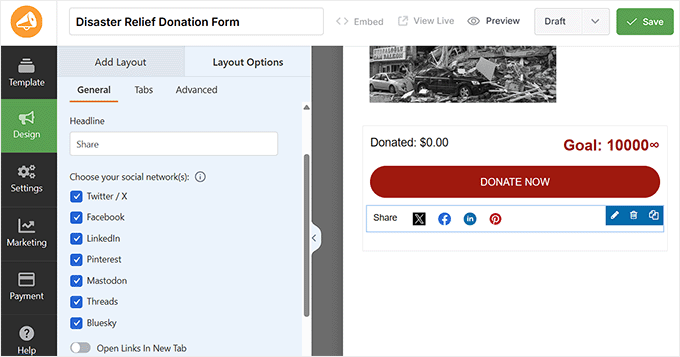
Charitable makes this simple with its built-in social sharing form field. You can add this field to your donation forms so that donors can see quick-share buttons right on the form.

This makes it easy for them to post the campaign link with just one click.

Add social sharing buttons with Charitable

For best results, you should place the sharing field on your thank-you page or at the end of the donation form. That’s when donors feel most motivated to spread the word and invite others to join the cause.

I personally use this technique in all my nonprofit projects, and it always helps bring in extra donations from friends and family of existing supporters.

13. Collect Offline Donations Too

Not every supporter gives online. Some prefer to hand over cash at an event, mail a check, or send a direct bank transfer.

If you don’t record these gifts, then your totals will look smaller than they really are, and donors may feel like their contributions don’t count.

Logging offline donations keeps your fundraising transparent and builds trust with your supporters. Charitable lets you add these gifts manually.

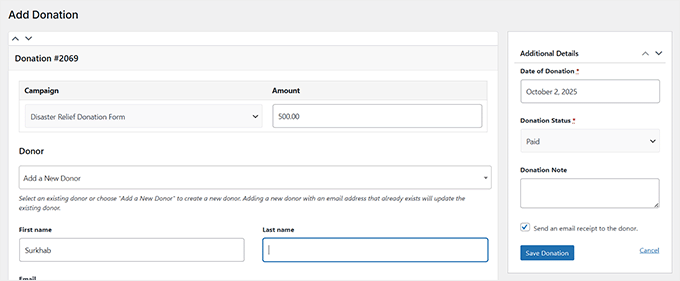
From your WordPress dashboard, head to the Charitable » Donations menu and click the ‘Add A Manual Donation’ button.

Click 'Add a Manual Donation' in Charitable

This will take you to a new screen where you can either select an existing donor or create a new one. Then enter the donation amount and assign it to the right campaign.

To finish, set the donation status to ‘Paid’ and click the ‘Save’ button.

Add a new donor in Charitable

The offline gift will then appear alongside your online donations, helping your progress bar and reports stay accurate.

πŸ’‘Expert Tip: To stay organized, I recommend keeping a simple checklist for offline gifts. For example:

  • Cash collected at fundraising events.
  • Bank transfers made directly to your nonprofit account.
  • Mailed checks from supporters or partner organizations.

Adding these into Charitable ensures your progress bars, reports, and thank-you emails reflect the full picture of your fundraising.

14. Segment Donor Emails for Better Appeals

Sending the same email to every donor rarely works. People give for different reasons, at different levels, and at different times. That’s why segmentation—dividing your email list into smaller groups—is such a powerful strategy.

It lets you craft messages that feel more personal and relevant, which usually leads to higher response rates.

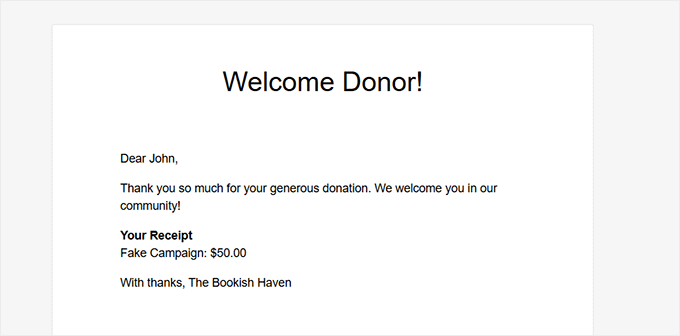
For example, you might send a special “welcome” series to first-time donors, while recurring donors could receive behind-the-scenes updates highlighting the long-term impact of their gifts.

Preview of a welcome email for donors

Supporters who give small amounts might be encouraged to set up a monthly donation, while those who have given larger amounts could be invited to join a leadership circle.

And don’t forget lapsed donors. You can send them a “we miss you” message with a clear, simple way to re-engage.

To make segmentation easier, you’ll want to use a reliable email marketing tool. I recommend Constant Contact, which is one of the best email marketing services out there.

Constant Contact

It makes it simple to create custom segments, schedule campaigns, and track which messages are performing best.

For details, see this guide on how to create an email newsletter.

How to Put These Donation Tips Into Action in 30 Days

When I first started running fundraising campaigns, I often felt overwhelmed by all the moving pieces. What helped me most was breaking things into small, weekly steps I could actually finish.

That’s exactly how I designed this 30-day action plan. It’s practical, doable, and will help you see real results without burning out.

Week 1: Quick Wins

  • Simplify your donation form (only ask for name, email, donation amount, payment information).
  • Add suggested donation amounts.
  • Turn on automatic thank-you emails.

Week 2: Recurring & Progress πŸš€

  • Enable recurring donations.
  • Customize billing periods (monthly, quarterly, yearly, etc.).
  • Add a fundraising goal + progress bar to your donation form.

Week 3: Marketing Push πŸ“ˆ

  • Create a campaign page with storytelling (Problem → Impact → Solution → Call-to-Action).
  • Share your first campaign update on social + send an email newsletter.
  • Run a limited-time or urgent campaign with a clear deadline.

Week 4: Scaling Up πŸ†

  • Enable peer-to-peer fundraising.
  • Pitch at least one local business for a corporate match.
  • Segment donor emails (first-time vs. recurring, large vs. small gifts).

Even if you don’t get through all 4 weeks, just tackling the first half of this plan will already make your donation system stronger and more effective.

The key is to start small, stay consistent, and keep building on your momentum.

Frequently Asked Questions About Nonprofit Donation Strategies

I’ve covered a lot of strategies in this guide, but you might still have a few practical questions about getting started.

Here are answers to the most common questions I hear from nonprofits when setting up donation campaigns.

Can I accept donations without a website?

Yes. You can use platforms like GoFundMe, PayPal donation links, or Facebook Fundraisers. But having your own WordPress site with a donation plugin like Charitable gives you more control, branding, and donor trust.

How do I set up recurring donations in WordPress?

You can use a tool like Charitable’s Recurring Donations addon. Once installed, you can set donation frequency (monthly, quarterly, yearly) directly on your campaign form. For details, see our guide on how to accept recurring donations.

Do I need PayPal to start accepting donations?

No. While PayPal is a popular choice, popular fundraising plugins like Charitable also support Stripe, Authorize.Net, Braintree, and other payment gateways. You can choose the one that works best for your donors.

What’s the best donation strategy to start with?

Start simple: enable suggested donation amounts and thank-you emails. These two changes boost average donation size and improve donor retention right away.

From there, you can layer on more advanced strategies like recurring donations or peer-to-peer fundraising.

I hope this article helped you learn some great ways to get more donations for your nonprofit website. You may also want to see our tutorial on creating a donor portal in WordPress and our expert picks for the best WordPress themes for nonprofit organizations.

If you liked this article, then please subscribe to our YouTube Channel for WordPress video tutorials. You can also find us on Twitter and Facebook.

The post 14 Ways I Get More Donations for My Nonprofit (I’ll Show You How) first appeared on WPBeginner.


from WPBeginner https://ift.tt/M4apDxz
More links is https://mwktutor.com
Monday, 24 November 2025

80+ WordPress Black Friday / Cyber Monday 2025 Deals (Huge Savings)

Each year, Black Friday and Cyber Monday bring some of the best opportunities to save on premium WordPress tools. Whether you’re looking to build a stronger website or expand your toolkit, this is the time to invest and get the best value for your money.

We’ve personally handpicked these top Black Friday deals for 2025, with exclusive discounts just for WPBeginner readers. From powerful plugins to high-speed hosting, there’s something for every WordPress user, and these deals are simply too good to miss.

These discounts are available for a LIMITED TIME only, so check each offer’s coupon and expiration date. Some deals may not be live yet, but keep an eye out, as they’ll be rolling out as they become available.

Note: We believe in full transparency. We may earn an affiliate commission when you buy using links on our site. This helps us continue finding the best deals for you. Learn More »

Important: Remember to bookmark this page πŸ”–. We will update it throughout the week as we find new deals and send exclusive deals to our newsletter subscribers.

Editor’s Pick

Below are the featured WordPress Black Friday deals that are our team’s favorite:

WPForms

Save 70% off WPForms – WPForms is the most powerful A.I. form builder for WordPress, used by 6 million+ sites. It comes with 2000+ pre-made form templates and drag & drop tool, so you can build any forms, like contact forms, surveys, payment forms, calculators & more.

Coupon code: Click Here
Offer Details: This deal is valid from Nov 24 – Nov 28.

All in One SEO for WordPress

Save 65% off AIOSEO – All in One SEO is the best WordPress SEO plugin that helps you rank in Google and AI tools like ChatGPT and others. It’s used by 3 million+ websites and offers tools like SEO audits, the TruSEO content analyzer, AI writing assistant, schema markup, local SEO tools, a redirection manager, and more.

Coupon code: Click Here
Offer Details: This deal is valid from Nov 24 – Nov 28.

SeedProd

Save 65% off SeedProd – SeedProd is the best AI website builder for WordPress. It enables you to make a custom website in less than 60 seconds using AI. It comes with a powerful drag-and-drop design tool with deeper AI integration to easily generate text and images or edit designs using simple text prompts.

Coupon code: Click Here
Offer Details: This deal is valid from November 24 to November 28.

WPConsent WordPress Cookie Consent and Privacy Compliance Plugin

Save 70% off WPConsent – WPConsent helps you stay compliant with GDPR and other privacy laws by showing clean cookie banners, managing user preferences, and blocking tracking scripts until users give permission — all with a simple, no-code setup.

Coupon code: Click Here
Offer Details: This deal is valid from Nov 24 – Nov 28.

Save 60% off Duplicator – Duplicator is the best WordPress migration and backup plugin on the market. It allows you to easily create automated secure backups, store them on the cloud, restore, migrate, and clone websites with one click.

Coupon code: Click Here
Offer Details: This deal is valid from November 24 to November 28.

WPChat Review: Is It the Right WordPress Chat Plugin for You?

Save 65% off WPChat – WPChat is a live chat tool that lets you offer instant customer support via WhatsApp, Instagram, Messenger, and Telegram. You can build intelligent Chat Funnels and offer instant answers with AI-powered FAQs around the clock.

Coupon code: Click Here
Offer Details: This deal is valid from November 24 to November 28.

memberpress logo

Save 50% off MemberPress – MemberPress is the #1 WordPress membership plugin that enables you to sell online courses, digital subscriptions, premium content, coaching and more. Creators using MemberPress have generated over $1billion in revenue.

Coupon code: Click Here
Offer Details: This deal is valid from Nov 24 to Nov 28.

SiteGround

Get 83% off SiteGround – SiteGround is one of the best hosting companies and an officially recommended WordPress hosting provider. They offer ultrafast hosting, built-in caching, an easy-to-use hosting dashboard, and heroic customer support.

Coupon code: Click Here
Offer Details: This deal is valid until December 3.

Nextiva

Get 44% off Nextiva – Nextiva is the best business phone service on the market. It allows you to get a virtual business phone number, share it with colleagues, forward calls, get an auto-attendant, and more. You can choose phone numbers in any geographic location or get a toll-free number.

Coupon code: Click Here
Offer Details: This deal is valid until November 28.

Uncanny Automator

Save 50% off Uncanny Automator – Uncanny Automator lets you easily create automated workflows inside WordPress. Connect your WordPress site and plugins to the top AI platforms and create smarter workflows without writing code.

Coupon code: Click Here
Offer Details: This deal is valid until November 28.

OptinMonster

Get 7 Months Free on OptinMonster – OptinMonster is the best lead generation and conversion optimization toolkit on the market. It helps you unlock the maximum revenue potential from every page and visitor on your website. Simply put, you get more email subscribers, leads, and sales. Used by over 1 million smart business owners.

Coupon code: Click Here
Offer Details: This deal is valid from November 24 to November 28.

Hostinger

Save 85% off Hostinger – Hostinger is one of the top WordPress hosting companies on the market. It offers blazingly fast hosting with a beginner-friendly control panel. During the holiday sales, Hostinger is offering big discounts and a free domain.

Coupon code: WPBEGINNER
Offer Details: This deal is valid until November 28.

Bluehost

Save 70% off Bluehost – Bluehost is one of the best WordPress hosting companies and an officially recommended WordPress hosting provider. They are offering WPBeginner users a generous discount on web hosting with a free domain name for $1.99 / month on Black Friday.

Coupon code: Click Here
Offer Details: This deal is valid until December 1.

Smash Balloon

Save 70% off Smash Balloon – Smash Balloon is the best social media feeds plugin for WordPress. It allows you to easily display your Facebook, Twitter, YouTube, TikTok, and Instagram feeds anywhere on your website. All your feeds are highly optimized for performance and look great on any screen size.

Coupon code: Click Here
Offer Details: This deal is valid from November 24 to November 28.

MonsterInsights

Save 70% off MonsterInsights – MonsterInsights is the best WordPress analytics plugin used by over 3 million sites. It makes it easy to set up comprehensive website analytics so you can see the website stats that matter and grow your business with confidence.

Coupon code: Click Here
Offer Details: This deal is valid from November 24 to November 28.

Sugar Calendar Coupon

Save 60% off Sugar Calendar Bookings – Sugar Calendar Bookings makes it easy to automate appointments, accept payments, and manage your schedule with ease. It offers everything you need to grow your service business while staying organized.

Coupon code: Click Here
Offer Details: This deal is valid from November 24 to November 28.

Is WPCode the right WordPress code snippets plugin for you?

Save $150 off WPCode – WPCode allows you to easily add custom code snippets without breaking your website. It includes a snippets library that saves you from installing several plugins. Plus, you can save your code snippets on the cloud and reuse them across your websites.

Coupon code: Click Here
Offer Details: This deal is valid from November 24 to November 28.

Charitable Coupon

Save 70% off Charitable – Charitable is a WordPress donation and fundraising plugin designed to empower charities, non-profits, and individuals. Launch custom fundraising campaigns and donation forms in minutes with the drag-and-drop campaign builder. It supports one-time and recurring donations, goal-based campaigns, donor walls, peer-to-peer fundraising, and tax-ready receipts.

Coupon code: Click Here
Offer Details: This deal is valid from November 24 to November 28.

Featured WordPress Hosting Deals

Whether you’re looking to start a new website or switch to a different web hosting provider, now is the best time. Below are the best WordPress hosting deals during this Black Friday:

SiteGround

Get 88% off SiteGroundSiteGround is one of the best hosting companies and an officially recommended WordPress hosting provider. They offer ultrafast hosting, built-in caching, an easy-to-use hosting dashboard, and heroic customer support.

Coupon code: Click Here
Offer Details: This deal is valid till December 2.

Hostinger

Save 85% off Hostinger – Hostinger is one of the top WordPress hosting companies on the market, offering blazingly fast hosting with a beginner-friendly control panel. They are offering a 78% discount with a free domain during the holiday sales.

Coupon code: Click Here
Offer Details: This offer is valid until December 8.

Bluehost

Save 70% off BluehostBluehost is one of the best WordPress hosting companies and an officially recommended WordPress hosting provider. They are offering WPBeginner users a generous discount on web hosting with a free domain name from $1.99 / month on Black Friday.

Coupon code: Click Here
Offer Details: This offer is valid until November 28.

Rapyd Cloud

Get 3-Months FREE on Rapyd Cloud – Rapyd Cloud delivers ultra-fast, high-concurrency managed WordPress hosting built for WooCommerce, membership sites, and large online communities. With powerful caching, scalable infrastructure, and developer-friendly tools, it keeps heavy sites running smoothly even under peak traffic.

Coupon code: BLACKFRIDAY25
Offer Details: This deal is valid till November 30.

  • Get 50% off WordPress.com – Offers managed WordPress hosting solution for growing websites, including custom plugins, themes, advanced SEO, and eCommerce tools.

  • Get 82% off HostGatorHostGator is one of the best WordPress hosting companies. They offer free domain + SSL with all hosting plans. Watch this space for more discounts and flash sales throughout the Black Friday weekend.
  • Get 72% off DreamHostDreamHost is one of the top WordPress hosting companies. Apart from the discount, you’ll also get a free domain name and SSL.
  • Get 84% off Hosting.com – Hosting.com offers shared WordPress hosting plans. They are offering an 84% discount on hosting.
Featured WordPress Plugin Deals

Want to upgrade your site functionality with premium WordPress plugins? Now is the best time with these huge discounts. Below are the best WordPress plugin deals during this Black Friday:

  • Get 70% off WPForms – WPForms is the best AI form builder, used by over 6 million sites. Generate complete forms using AI in minutes with custom fields, conditional logic, calculations, surveys, conversational forms, payment and marketing integrations, and more.
  • Get 65% off All in One SEO – Used by over 3 million websites, All in One SEO helps you get higher SEO rankings with SEO audits, an AI-powered content optimization, smart sitemaps, schema markup, local SEO tools, and a redirection manager. Leverage AI in your SEO workflow witha built-in AI assistant, LLMs.txt support, and AI image generation.
WPConsent WordPress Cookie Consent and Privacy Compliance Plugin

Save 70% off WPConsent – WPConsent helps you stay compliant with GDPR and other privacy laws by showing clean cookie banners, managing user preferences, and blocking tracking scripts until users give permission — all with a simple, no-code setup.

Coupon code: Click Here
Offer Details: This deal is valid from Nov 24 – Nov 28.

  • Get 60% off Duplicator – The best WordPress backup and migration plugin. Allows you to easily back up your site, automatically store backups on the cloud, and easily restore and migrate websites with just a few clicks.
  • Get 52% off OptinMonster – OptinMonster is the best lead generation and conversion optimization toolkit on the market. It helps you get more email subscribers and convert abandoning website visitors into customers.
WPChat Review: Is It the Right WordPress Chat Plugin for You?

Save 65% off WPChat – WPChat turns casual visitors into meaningful conversations with intelligent Chat Funnels, live support across WhatsApp, Messenger, and Telegram, and AI-powered FAQs that deliver instant answers around the clock.

Coupon code: Click Here
Offer Details: This deal is valid from November 24 to November 28.

  • Get 65% off SeedProd – SeedProd is the #1 page and theme builder for WordPress. It allows you to quickly make landing pages that work independently of your WordPress theme or plugins, and are designed for speed, higher conversions, and more sales.
  • Get 70% off MonsterInsights – MonsterInsights is the best WordPress analytics plugin used by over 3 million sites. It makes it easy to set up comprehensive website analytics, see the website stats that matter, and grow your business confidently.
Sugar Calendar Coupon

Save 60% off Sugar Calendar Bookings – Sugar Calendar Bookings makes it easy to automate appointments, accept payments, and manage your schedule with ease. It offers everything you need to grow your service business while staying organized.

Coupon code: Click Here
Offer Details: This deal is valid from November 24 to November 28.

  • Get 50% off Uncanny Automator – Uncanny Automator allows you to easily create automated workflows inside WordPress. Connect your WordPress site and plugins to the top AI platforms and create smarter workflows without writing code.
  • Get 70% off Smash Balloon – Smash Balloon is the best social media feeds plugin for WordPress. It allows you to easily display your Facebook, Twitter, YouTube, TikTok, and Instagram feeds anywhere on your website. All your feeds are highly optimized for performance and look great on any screen size.
  • Get 70% off WP Simple Pay – WP Simple Pay is the best Stripe plugin for WordPress. It lets you easily add payment forms and accept online payments, recurring subscriptions, and donations without the hassle of a full eCommerce plugin.
Is WP Mail SMTP the best SMTP WordPress plugin?

Save $60 off WP Mail SMTP – WP Mail SMTP fixes email deliverability issues in WordPress by authenticating your emails through trusted SMTP providers. It ensures your contact forms, notifications, and order receipts land in the inbox—not the spam folder.

Coupon code: Click Here
Offer details: This deal is valid from November 24 to November 28.

  • Get 60% off Thrive Themes – Thrive Themes offers WordPress themes and plugins for creating thriving online businesses. These include tools to build websites, run quizzes, create memberships, add testimonials, AB testing, comments, and more.
  • Get 65% off PDF Embedder – Easily embed and display PDF files directly in WordPress with a responsive, customizable viewer. Enjoy advanced features like secure file access, dynamic watermarks, downloadable insights, and auto-generated thumbnails.
  • Get 65% off UserFeedback – UserFeedback is a powerful tool for gathering real-time insights from your website visitors. Create and display surveys, polls, and feedback forms to understand user preferences, improve engagement, and drive better decision-making.
SearchWP

Get 62% off SearchWP – SearchWP upgrades your WordPress search so visitors can actually find what they’re looking for. It indexes everything, including custom fields, documents, products, and more, to deliver fast, accurate, and relevant search results.

Coupon code: Click Here
Offer details: This deal is valid from November 24 to November 28.

  • Get 50% off MemberPressMemberPress is the #1 WordPress membership plugin that enables you to sell digital subscriptions, premium content, and online courses easily. Includes powerful access rules, multiple payment gateways, and easy community-building features.
  • Get 65% off Formidable Forms – Allows you to easily create advanced forms, calculators, and more for your WordPress website.
  • Get $150 off WPCode – WPCode lets you easily generate custom code snippets in WordPress using AI. Save any custom code and easily insert it into your site. It includes a snippets library that saves you from installing several plugins. Plus, you can save your code snippets on the cloud and reuse them across your websites.
  • Get 70% off Charitable – The best WordPress donations plugin. Allows you to easily accept donations online. Supports recurring donations, donor management, fundraising campaigns, and marketing integrations.
  • Get 70% off Easy Digital Downloads – Easy Digital Downloads is the best eCommerce plugin for selling digital goods. It lets you easily sell digital downloads online, accept payments, manage licenses, and more.
  • Get 70% off AffiliateWP – AffiliateWP gives you a complete affiliate management system inside WordPress. It lets you track referrals accurately, create custom commissions, and grow your sales by empowering influencers and partners to promote your products.
RewardsWP Coupon Code

Get 65% off RewardsWP – RewardsWP lets you add points, rewards, and referral incentives to your WordPress site. It encourages repeat purchases, boosts customer loyalty, and turns your existing users into active brand promoters—all fully integrated with AffiliateWP.

Coupon code: Click Here
Offer details: This deal is valid from November 24 to November 28.

  • Get 60% off PushEngage – PushEngage allows you to easily send web push notifications to your customers across desktop and mobile devices. It comes with personalized campaigns, powerful trigger rules, cart abandonment reminders, automated drip campaigns, and eCommerce integrations.
  • Get 65% off Envira Gallery – Envira Gallery is the best WordPress gallery and photography plugin. It allows you to add beautiful photo galleries to your website easily.
  • Get 70% off Easy WP SMTP – Allows you to send WordPress emails using secure SMTP.
  • Get 65% off RafflePress – RafflePress is the best WordPress giveaway and contest plugin. It helps you grow your email list, website traffic, and social media followers with viral giveaways.
BuddyBoss Review: Is It the Right Community Platform for You?

Save 40% off BuddyBoss – BuddyBoss offers a powerful platform for building online communities, memberships, and courses on WordPress. With features like social networking, eLearning, and group functionality, it’s perfect for creating engaging, interactive websites.

Coupon code: Click Here
Offer Details: This offer is valid until November 30.

  • Get 60% off StoreAgent – StoreAgent.ai uses AI to turn your product catalogue into a smart, conversion-driven storefront. With features like AI product descriptions, chatbot, and product insights, it makes it super easy to manage and grow your WooCommerce store.
  • Get 60% off Wholesale Suite – Wholesale Suite lets you easily add wholesale to your WooCommerce store. It allows you to manage wholesale user roles, add wholesale pricing, product visibility, order minimums, and more.
  • Get 60% off Advanced Coupons – Advanced Coupons allows you to create coupons on your WooCommerce store easily.
  • Get 50% off FunnelKit – Make powerful sales funnels to create high-converting checkouts, order bumps, upsells, and automation.
  • Get 50% off Business Directory Plugin – Easily add a business directory to your WordPress website.
  • Get 65% off NextGen / Imagely – One of the most popular WordPress photography and gallery plugins.
  • Get 50% off TrustPulse – TrustPulse allows you to leverage the true power of social proof and instantly increase site conversions.
Search and Replace Everything

Get $100 off Search & Replace by WPCode – Search and Replace Everything by WPCode simplifies content updates across your WordPress site. Quickly find and replace text, URLs, or code snippets site-wide, saving time and ensuring consistency—no coding required.

Coupon code: Click Here
Offer details: This deal is valid from November 24 to November 28.

Featured WordPress Theme Deals

Want to switch themes and upgrade to a premium WordPress theme? Now is the best time with these huge discounts. Below are the best WordPress theme deals during this Black Friday:

Save Big on Elegant ThemesElegant Themes is one of the top WordPress theme companies. Their popular theme, Divi, offers a drag-and-drop page builder along with hundreds of pre-made design layouts. They are offering huge discounts, iMac giveaways, and other free prizes.

Coupon code: Click Here
Offer details: This offer is available from November 25 to November 28.

  • Get 40% off aThemes – aThemes offers fast, beautifully designed WordPress themes with dozens of ready-to-use starter sites to help you build any type of website quickly. They also offer custom blocks, addons, and intuitive customization options to easily design your website the way you want it.
  • Get 65% off SeedProd – SeedProd is the best AI website builder for WordPress. It allows you to quickly make complete websites with your own custom theme.
  • Get 60% off Thrive Themes – Easily build your WordPress theme with a marketing-focused drag-and-drop theme builder.
  • Get 65% off Imagely Themes – From the people behind the NextGen Gallery, Imagely offers beautifully designed WordPress themes for photography websites.

Featured SaaS & Services Deals

Want to upgrade your site functionality with premium SaaS platforms and services? Now is the best time with these huge discounts. Below are the best SaaS and services deals available during this Black Friday:

  • Get 52% off OptinMonster – OptinMonster is the best lead generation and conversion optimization toolkit on the market. It helps you get more email subscribers and convert abandoning website visitors into customers.
  • Get 60% off PushEngage – PushEngage allows you to easily send web push notifications to your customers across desktop and mobile devices.
  • Get Free Trial with SendLayer – SendLayer is the best SMTP service provider with higher deliverability. They are offering a free trial for up to 200 emails.
LowFruits

Get 40% off LowFruits – LowFruits is an SEO tool that helps you find low-competition keywords to boost your website’s search rankings. With powerful filters and insights, it’s ideal for uncovering content opportunities and driving targeted organic traffic.

Coupon code: Click Here
Offer details: This offer is valid from November 24 to November 28.

  • Get 44% off Nextiva – Nextiva is the best business phone service on the market. It allows you to easily manage business calls on any device, share numbers with colleagues, forward calls, get toll-free numbers, and more.
SEOBoost

Get 70% off SEOBoost – SEOBoost is a comprehensive SEO tool designed to improve your website’s search visibility. It offers keyword tracking, site audits, and backlink analysis, helping you optimize content and drive more organic traffic effortlessly.

Coupon code: Click Here
Offer details: This offer is valid from November 24 to November 28.

  • Get 50% off TrustPulse – TrustPulse allows you to leverage the true power of social proof and instantly increase site conversions.
  • Get a Free Trial of Beacon – Beacon makes creating beautiful lead magnets and eBooks from your existing content easy, helping you grow your email list effortlessly.

Other WordPress Black Friday Deals

Below is a comprehensive list of WordPress Black Friday deals that were submitted through our contact form:


That’s all for now. We will be adding more deals and updating this page throughout the month.

Aside from these, we also have tons of other WordPress deals and discounts for WPBeginner readers.

Hopefully, you can take advantage of some of these limited-time deals. Have a happy Thanksgiving.

P.S. If you’re a WordPress company offering a discount or know of one that is having a deal, then please send us a message via our contact form so that we can update this article.

If you liked this article, then please subscribe to our YouTube Channel for WordPress video tutorials. You can also find us on Twitter and Facebook.

The post 80+ WordPress Black Friday / Cyber Monday 2025 Deals (Huge Savings) first appeared on WPBeginner.


from WPBeginner https://ift.tt/mcr6dNw
More links is https://mwktutor.com