Monday, 15 December 2025

7 Best WooCommerce Sliding Side Cart Plugins (I Tested 13)

Cart abandonment is one of the most frustrating challenges for any online store owner. You’ve done the hard work to attract shoppers, but many still leave before completing their purchases.

One common reason? Shoppers get annoyed when they have to leave the product page just to check what’s in their cart.

That’s where sliding side carts come in. They let customers easily review and manage their purchases without losing focus or interrupting their browsing flow.

For this roundup, I’ve tested the best WooCommerce sliding side cart plugins to help you find the best option to boost your sales. 📈
Best WooCommerce Sliding Side Cart Plugins

Quick Overview: 7 Best WooCommerce Sliding Side Cart Plugins

Before I dive into the details, here’s a quick look at the best plugins and what makes each one stand out:

Product Free Plan Starting Price (/yr) Best For Key Feature
aThemes Merchant $79 Stores that need built-in conversion tools Smart cross-sells and countdown timers
FunnelKit Cart $99.50 High-volume stores focused on order value One-click upsells and seamless checkout flow
ShopEngine $53.10 Elementor users who want full design control Visual builder for custom side carts
Side Cart WooCommerce Free Small shops that need a quick, simple setup Real-time cart updates without page reloads
Fast Cart for WooCommerce Free Stores that want a fast, Ajax-powered cart Lightweight design with live updates and smooth UX
Side Popup Cart for WooCommerce $39 Stores that need a flexible cart layout Both popup and sliding side cart options
WPC Fly Cart for WooCommerce $29 Stores that value style and user engagement Beautiful animations with customizable cart bubbles

Why Add a Sliding Side Cart to WooCommerce?

A sliding side cart lets shoppers review their items without leaving the page they are on. It makes the checkout process smoother and helps reduce cart abandonment.

Sliding side carts solve a major friction point in the shopping process. Instead of forcing customers to navigate away from product pages, they can instantly review their cart, make changes, and continue shopping. All while staying engaged with your products.

Running an online store means every small improvement in user experience can lead to more completed purchases and higher revenue.

Here are some other main benefits of using a sliding side cart:

  • Reduces page loads – Customers can view and edit cart contents instantly.
  • 📈 Increases conversions – Less friction means more completed purchases.
  • ⏱️ Saves time – Quick access to cart functions like quantity changes and coupon codes.
  • 👔 Looks professional – Customers expect this type of smooth interaction in modern stores.

As Chris Klosowski, the president of Easy Digital Downloads, says:

A long or confusing checkout process can drive customers away. The simpler it is, the more likely shoppers are to complete their purchase – or even add more items to their cart.

Chris KlosowskiChris Klosowski, the president of Easy Digital Downloads

Most side cart plugins also offer full customization, so you can adjust colors, animations, and cart elements to match your brand without coding. Plus, you can track performance to see how these improvements impact your conversion rates.

Summing up everything, a good sliding side cart plugin can make the difference between a sale and an abandoned cart. 🛒

How I Tested and Reviewed WooCommerce Sliding Side Cart Plugins

I tested these plugins by installing each one on a live WooCommerce store and running through real shopping scenarios. I wanted to see which ones felt smooth, looked professional, and actually helped customers complete their purchases faster.

Here’s what I focused on during testing:

  • Installation and setup: I installed each plugin from scratch to see how quickly I could get a working sliding cart.
  • User experience: I added products, changed quantities, and applied coupons to test the overall cart flow. I also ran test purchases to see how each cart handled checkout.
  • Customization options: I explored the design settings to find out how much control each plugin gives over the cart’s look and layout.
  • Performance impact: I checked page load times before and after installing each plugin.
  • Mobile responsiveness: I tested each cart on different devices to see how well it worked on mobile.

This approach helped me identify plugins that not only look good but actually improve the shopping experience for real customers.

Why Trust My Recommendations?

At WPBeginner, we’ve been helping WordPress users for over 16 years — and that includes countless WooCommerce store owners. Our goal is to share honest, practical advice that helps you choose tools that actually improve your store’s performance.

For this guide, I personally tested popular WooCommerce plugins on live sites to see how they perform in real shopping scenarios. I looked at design, speed, ease of use, and how well they help customers complete purchases – quickly and easily.

All my recommendations come from hands-on testing, not marketing claims. And I only include plugins I’d confidently use on my own sites or recommend to my friends and family.

You can read more about our process in our editorial guidelines.

With that said, here are my top picks:

1. AThemes Merchant

🏅 Best WooCommerce Sliding Side Cart for Conversion-Focused Stores
Merchant
Merchant Pros ✅ Easy to use (beginner-friendly)
✅ Seamless integration with WooCommerce
✅ Boosts user experience with sleek, customizable sliding cart
✅ Offers tools for increased conversions, like recommendations and timers
✅ Broad compatibility with popular WordPress/ WooCommerce themes
✅ Includes both sliding side cart and floating mini cart
Merchant Cons ❌ Some advanced tools are Premium-only
❌ Could be overwhelming for stores wanting just basic cart functionality
Pricing Free (Lite)
Premium starts from $79/year
Best For Stores that want a modern, conversion-focused cart experience

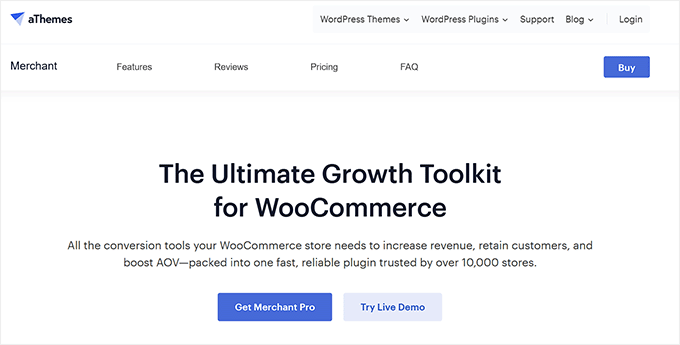
Merchant isn’t just a sliding cart plugin — it’s a full conversion toolkit. It’s ideal if you want to drive more sales using smart recommendations, countdowns, and other urgency features.

I’ve personally tested Merchant on several WooCommerce stores. The sliding cart looks great and works perfectly with tools like countdown timers and product recommendations.

My Experience

When I installed Merchant, the setup was incredibly straightforward. The interface felt intuitive, even if it was being used by someone new to WooCommerce plugins.

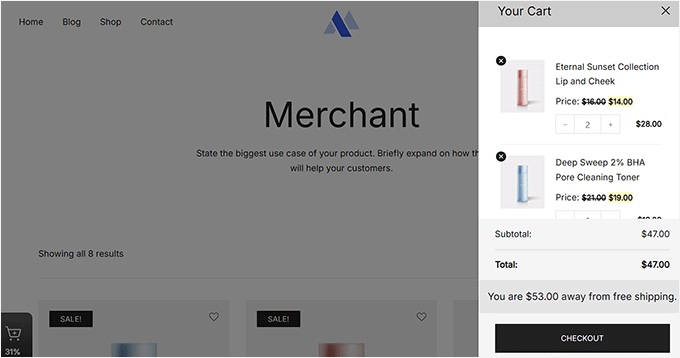
The plugin supports both sliding and floating cart options. So you can choose what works best for your store’s design.

During testing, I could enable the sliding side cart immediately and then customize colors and button text without any technical trouble. I also found that the plugin has over 10 different add-to-cart animations, making customization more flexible.
Merchant Sliding cart

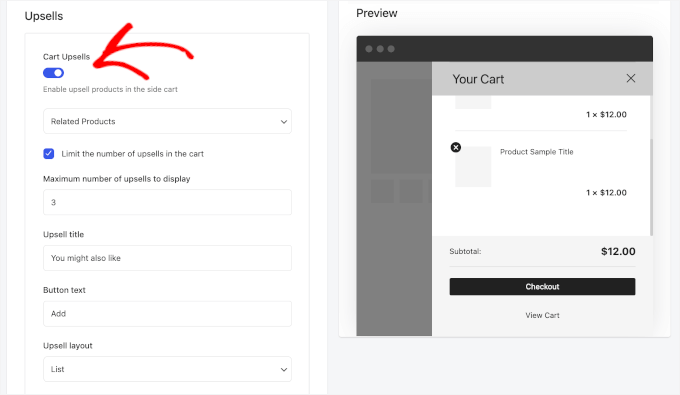
But what impressed me most were the smart cross-sell recommendations that appeared in the cart.

Unlike basic plugins that just show random products, Merchant suggested items that actually made sense with what customers had already added. This felt more like a helpful shopping assistant than pushy sales tactics.
Cart upsells in Merchant

The integrated “cart reserved” timer is another highlight, as it can help you create urgency without being annoying. When customers add items, a countdown appears showing how long their cart will be held.

The only downside I noticed was that some advanced tools, like product recommendations and complete design options, require the Pro plan.

🧑‍💻 Why I recommend Merchant: Overall, Merchant is a good fit for stores that want more than just a basic sliding cart. This plugin combines cart functionality with proven conversion tools to increase sales.

2. FunnelKit Cart

🏅 Best WooCommerce Sliding Side Cart for High-Volume Stores
FunnelKit Cart
Pros of FunnelKit Cart ✅ One-click upsells increase order value
✅ Built-in coupon and discount options
✅ Handles high-volume store traffic
✅ Pre-built checkout templates save time
Cons of FunnelKit Cart ❌ Initial setup to integrate upsells effectively can take time
❌ May have too many features for smaller stores
Pricing Free (Lite)
Pro starts at $99.5/year
Best For High-volume WooCommerce stores focused on boosting sales through upsells and streamlined checkout

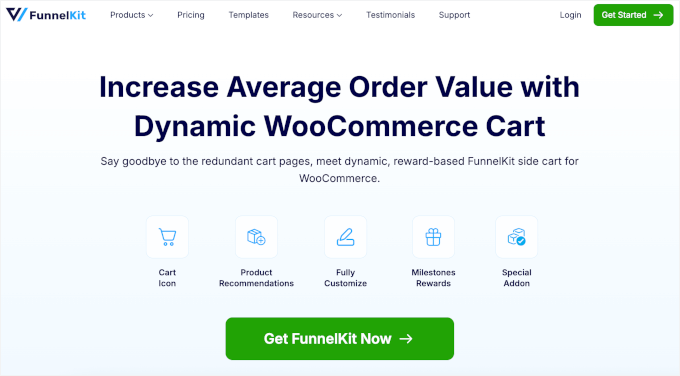
FunnelKit Cart is built specifically for stores that want to maximize revenue through strategic upselling. It’s especially useful for high-volume stores aiming to increase their average order values.

Some people I know who manage busy WooCommerce stores have mentioned that FunnelKit Cart has made a noticeable difference for them. They’ve pointed out features like the quick upsells and smoother checkout process as helpful for increasing their sales.

For this roundup, I’m putting those claims to the test.

My Experience

When I set up the side cart, the pre-built checkout templates saved a lot of time. Instead of starting from scratch, I just picked a layout and adjusted it to fit my store’s design.

Then, I tried the built-in discount and coupon tools, which made it easy to offer incentives right inside the cart. I could add free shipping, gift options, and promo codes without leaving the setup screen.
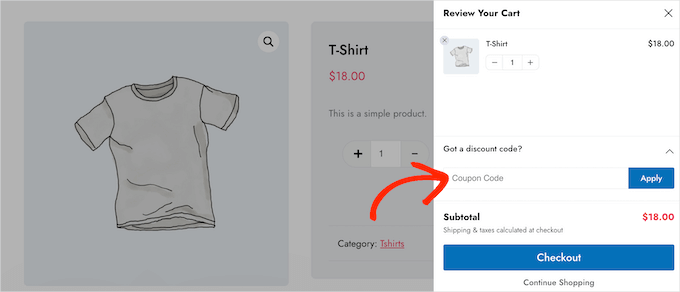
Adding coupon codes to a sliding side cart in WooCommerce

I liked how customizable the side cart drawer was, too.

I could tweak slide animations, layout, size, and colors to match my store’s look, and everything felt clean and professional.

Plus, the one-click upsells really stood out. When customers added items to their cart, relevant product suggestions appeared with quick ‘Add to Cart’ buttons.
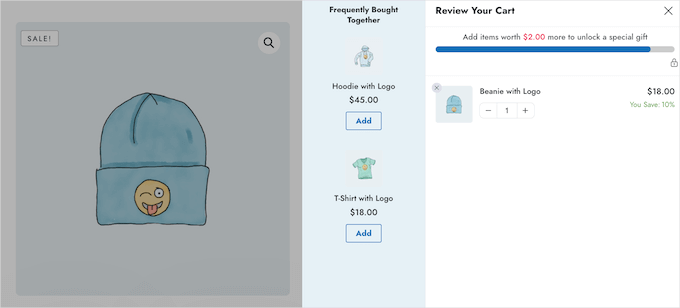
Get more sales with upselling and cross-selling promotions

The side cart also worked beautifully on mobile. When I tested it out, it felt smooth and responsive on phones, tablets, and desktops.

The only downside was that setting up upsell rules took a bit longer than with simpler cart plugins, especially if you want to add several product recommendations.

Why I Recommend FunnelKit Cart: In summary, FunnelKit Cart is perfect for growing stores focused on making more sales. The upselling features actually work to increase order values.

3. ShopEngine WooCommerce Builder for Elementor

🏅 Best for Elementor Users
ShopEngine
Pros of ShopEngine ✅ Full integration with Elementor page builder
✅ 40+ pre-made WooCommerce templates included
✅ Complete visual customization without coding
✅ Modular cart elements you can enable or disable
Cons of ShopEngine ❌ Only works with Elementor
❌ Can feel bloated if you only need a side cart (since it’s a complete WooCommerce builder module)
Pricing Free (Lite)
Pro starts at $53.1/year
Best For Elementor users who want to create custom side carts and complete WooCommerce layouts without coding

ShopEngine is perfect for anyone already using Elementor (a popular drag-and-drop page builder) who wants complete design control over their sliding cart. It goes beyond basic cart functionality to offer full WooCommerce customization.

My Experience

While testing this plugin, the modular side cart system impressed me right away. I could easily turn individual elements on or off, like cart totals or checkout buttons, with just a few clicks.
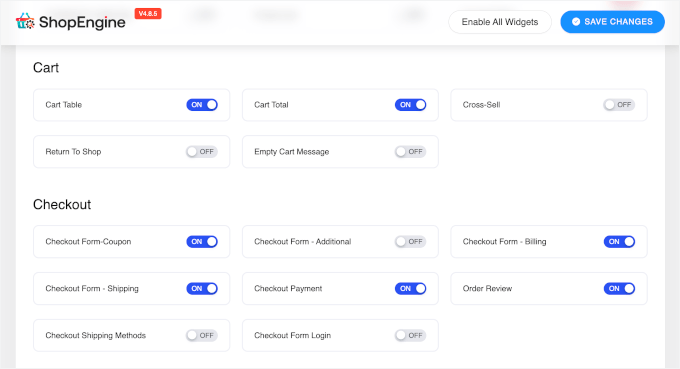
ShopEngine's modules

Plus, I found that the integration with both Elementor and WooCommerce felt natural.

All the tools I already knew were right there, working exactly as expected. The drag-and-drop cart builder made it easy to rearrange elements like buttons, text, spacing, and more.

The 40+ pre-made WooCommerce templates were a huge bonus. They included ready-to-use layouts for product pages, carts, and checkout flows that looked clean and professional from the start.
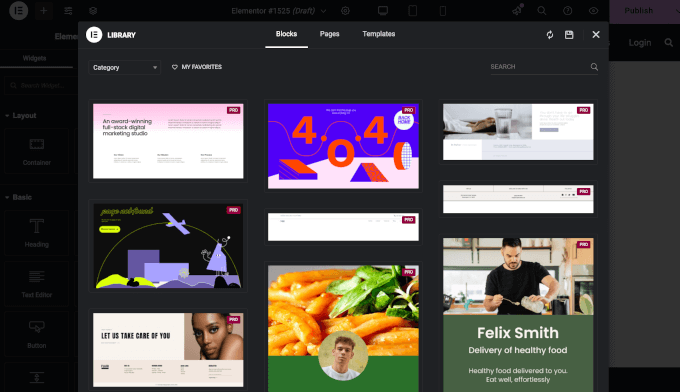
Elementor's templates

I also liked the built-in Elementor widgets for flash sale countdowns and cross-sell promos. They worked smoothly within the cart, so I could add urgency and boost sales without installing extra plugins.

The only drawback? If you’re not using Elementor, you won’t get as much value out of this plugin.

Why I Recommend ShopEngine: Put simply, ShopEngine is perfect for Elementor users who want complete design freedom. It turns cart customization into a visual design process rather than a technical configuration.

4. Side Cart WooCommerce

🏅 Best for Simple Projects
Side Cart WooCommerce
Pros of Side Cart WooCommerce ✅ Setup takes just a few clicks
✅ Works smoothly with any theme
✅ Real-time cart updates without page loads
✅ Lightweight design doesn’t slow down sites
Cons of Side Cart WooCommerce ❌ Focuses only on basic cart functionality
❌ No built-in upselling or marketing features in the free version
Pricing Free (Lite)
Pro starts at $29/year
Best For Small projects that need a quick-to-setup floating cart

Side Cart WooCommerce focuses on doing one thing really well: adding a clean, functional sliding cart without any complexity. It’s ideal for smaller stores that need basic cart functionality up and running fast.

I tried out this plugin for a smaller project, and it was refreshingly simple. Setup only took a few clicks, and it instantly added a clean side cart drawer that works smoothly with any WordPress theme.

My Experience

During testing, setup was quick and straightforward. I could choose between different sliding side cart styles (cards and rows) right from the settings. Both looked clean and professional without needing extra tweaks.

Customization was also simple. I could adjust cart icon, colors, button text, and widget positions in just a few minutes, with settings that felt intuitive and not overwhelming.
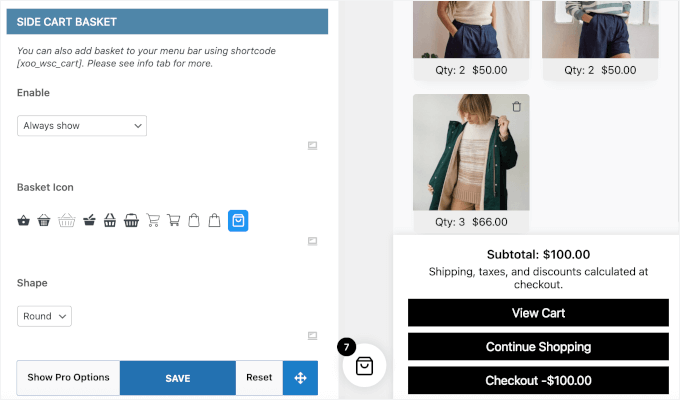
Side Cart WooCommerce's basket customization

I also appreciated the custom URL option, which let me redirect customers after checkout. I usually do this for sending them to confirmation, thank-you pages, or special offers, which then makes conversion tracking a lot easier.

Real-time cart updates also worked flawlessly. Any time I added or removed products, the cart refreshed instantly without reloading the page.
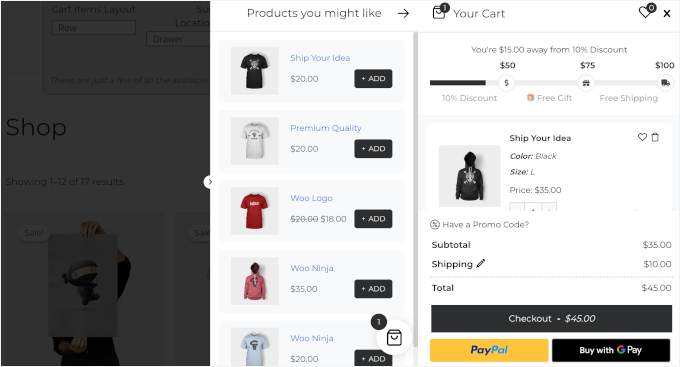
Side Cart WooCommerce's side cart demo

The only downside is that the free plan doesn’t include advanced tools like product recommendations or built-in marketing features. It keeps things simple and focuses purely on core cart functionality.

Why I Recommend Side Cart WooCommerce: The bottom line is that Side Cart WooCommerce works great for straightforward needs. Setup is incredibly fast and simple, and it delivers exactly what most stores need without extra complexity.

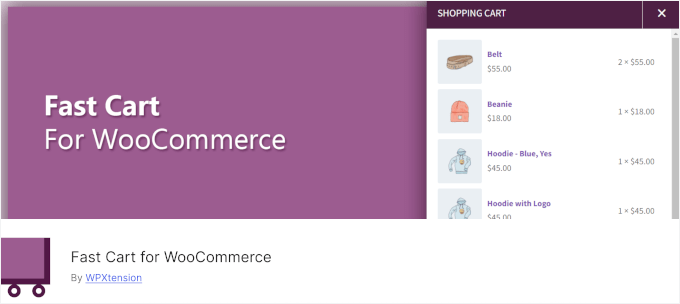
5. Fast Cart for WooCommerce

🏅 Best Free WooCommerce Sliding Side Cart
Fast Cart for WooCommerce
Pros of Fast Cart for WooCommerce ✅ Completely free with no premium version
✅ Ajax-powered cart updates without page reloads
✅ Light/dark mode design options
✅ Mobile-responsive on all devices
Cons of Fast Cart for WooCommerce ❌ Focuses mainly on cart interaction
❌ No advanced marketing tools like upselling
❌ Limited compared to premium alternatives
Pricing Free
Best For A free, user-friendly, Ajax-powered floating cart that makes checkout smoother

Fast Cart for WooCommerce excels at creating smooth, interactive cart experiences without customers having to reload the page. It works best for stores that want professional cart functionality without any cost.

My Experience

When I tested Fast Cart for WooCommerce, what stood out was the sleek, Ajax-powered side cart. Ajax technology allows the cart to update instantly without reloading the entire page, creating a much smoother shopping experience.

This can keep the whole shopping experience smooth and seamless.

For a completely free plugin, the design flexibility was impressive. I could switch between light and dark modes, adjust colors, and customize buttons to fit different store themes. Most free tools keep customization pretty limited, but this one felt surprisingly polished.
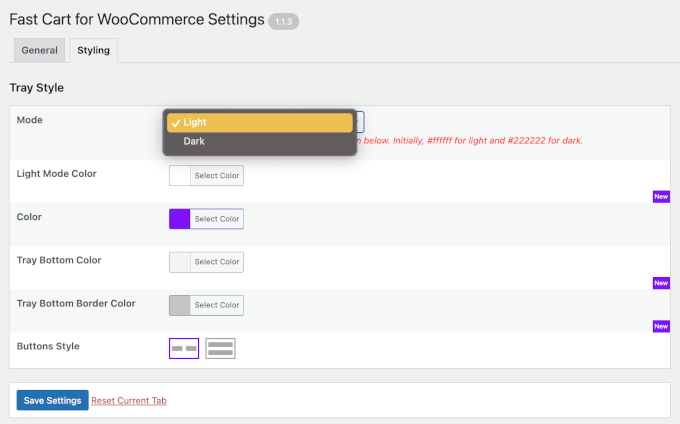
Styling tab in the Fast Cart for WooCommerce plugin

Mobile performance was just as solid. The cart adapted automatically to phones and tablets, so I didn’t have to set up separate mobile configurations.

Unlike premium plugins that offer marketing extras, Fast Cart for WooCommerce focuses on doing one thing: providing a clean, reliable cart experience without any unnecessary clutter.

Why I Recommend Fast Cart for WooCommerce: Overall, Fast Cart for WooCommerce works well for stores that prioritize smooth cart interaction. It’s completely free, works beautifully, and the Ajax functionality makes shopping feel modern.

6. Side Popup Cart for WooCommerce

🏅 Best for Real-Time Updates
Side Popup Cart for WooCommerce
Pros of Side Popup Cart for WooCommerce ✅ Both side and popup cart options available
✅ Real-time cart updates keep shoppers informed
✅ Easy color and button customization
✅ Lightweight build doesn’t slow down sites
Cons of Side Popup Cart for WooCommerce ❌ Setup options can feel overwhelming initially
❌ Premium pricing for what’s offered
Pricing Starts at $39/year
Best For Store owners looking for a lightweight, responsive cart solution with real-time updates

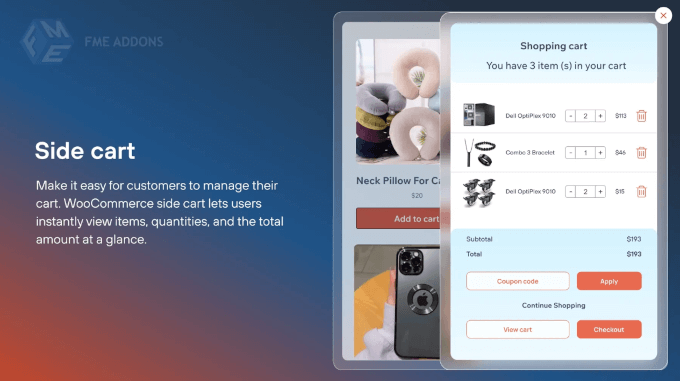
Side Popup Cart for WooCommerce gives you flexibility with both sliding side carts and popup options. It’s ideal for stores that want to show customers engaging, real-time updates without sacrificing site speed.

My Experience

When I first set up the plugin, I liked that it offered both a sliding side cart and a popup cart option.

That gave me the flexibility to choose the layout that best fit my store’s design.
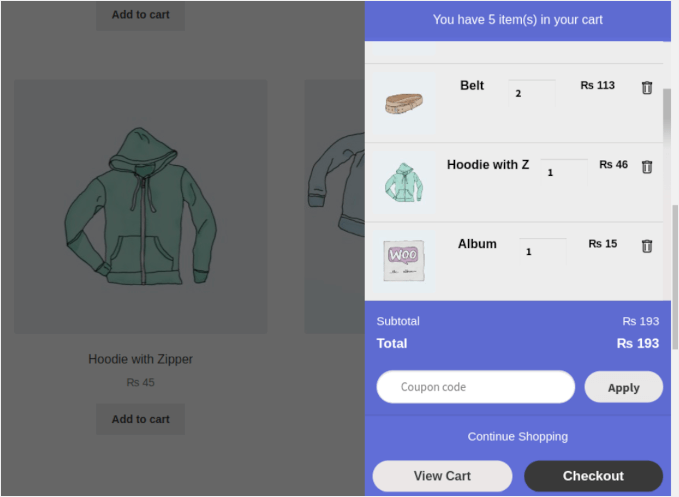
Side Popup Cart's side cart demo

Real-time cart updates worked flawlessly. When customers added or removed items, everything refreshed instantly without reloading the page.

Customization was straightforward. I could adjust colors, button text, and widget placement to match my store’s branding, all without touching a line of code.

I also appreciated the option to hide the cart on certain pages. It helped keep landing pages and checkout flows clean and focused without unnecessary distractions.

Hiding side cart on certain pages

Custom redirect URLs were a nice bonus, too. After checkout, I could send customers to thank-you pages or special offers, which helped improve the overall flow.

However, the variety of features and customization options can feel overwhelming during initial setup, especially if you just want basic cart functionality.

Why I Recommend Side Popup Cart for WooCommerce: In short, Side Popup Cart for WooCommerce works well for stores prioritizing performance and engagement. It delivers modern cart features while keeping your site fast and responsive.

7. WPC Fly Cart for WooCommerce

🏅 Best for Visual Appeal and Smooth Animations

WPC Fly Cart for WooCommerce
Pros of WPC Fly Cart for WooCommerce ✅ Smooth animations and Ajax-powered experience
✅ 16+ different bubble icon types available
✅ 5+ predefined cart skins with color customization
✅ Integrates easily with most store layouts
Cons of WPC Fly Cart for WooCommerce ❌ Essential features like instant checkout, shipping totals, and coupon support require the premium version
❌ One-time payment may feel expensive for small stores
Pricing Starts at $29
Best For Creating an engaging visual experience with smooth animations and flexible design options

WPC Fly Cart prioritizes visual appeal and smooth user interactions above everything else. It’s designed for store owners who want their cart to feel polished and engaging, with plenty of design options to match any brand aesthetic.

My Experience

After setup, the smooth sliding animations immediately caught my attention. Unlike basic carts that appear and disappear, the WPC Fly Cart moved with fluid transitions that felt polished.

In fact, the visual quality reminded me of premium eCommerce sites rather than smaller WordPress stores.
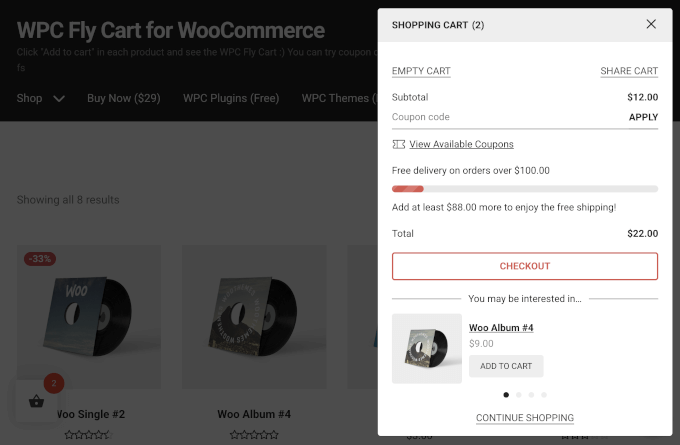
WPC Fly Cart's sliding side cart

The design flexibility was another big plus. I could choose from over 16 bubble icons, several cart skins, and different display styles — from solid colors to image backgrounds. It made it easy to match the cart to my store’s look.

I also liked how much control I had over the cart’s details. It let me decide what to show: totals, subtotals, buttons, or product information, so customers only saw what they needed.

You can also enable suggested products for upsell and cross-sells. If you want to add the comparison or wishlist feature, you can do that, too.

Adding suggested products in WPC Fly Cart

Additionally, this plugin worked perfectly with all WooCommerce product types, including simple, variable, and grouped items.

One key limitation is that WPC Fly Cart restricts some eCommerce features, such as instant checkout, the shipping calculator, and coupon functionality, to the premium version.

Why I Recommend WPC Fly Cart for WooCommerce: WPC Fly Cart is best for stores where design quality and user experience matter most. However, keep in mind that features such as instant checkout, a cart total calculator, and coupon options are only available in the premium version.

Alternatives: Other WooCommerce Sliding Side Cart Plugins I Tested

Here are a few more plugins that I tested for this review.

Caddy

Caddy 🟢 Good: Clean slide-out cart with upsells and “save for later.” Free version supports product recommendations and basic styling.
🔴 Bad: Advanced features like save lists and analytics require the premium plan.
⭐ Best For: Stores that want a simple cart with light sales-boosting tools.

XT Floating Cart for WooCommerce

XplodedThemes 🟢 Good: Smooth animations, live updates, and full design control. Includes a free shipping bar and a coupon field.
🔴 Bad: Pro plan can be pricey for small stores, and some users note CSS issues with custom themes.
⭐ Best For: Stores wanting a modern shopping experience with slide-out effects.

Addonify Floating Cart for WooCommerce

Addonify 🟢 Good: Free, responsive, and lightweight. Includes live updates and the Undo functionality for removed items.
🔴 Bad: Lacks advanced marketing tools and design presets.
⭐ Best For: Beginners who need a simple, reliable slide-out cart.

CartPops

CartPops 🟢 Good: Elegant fly-out cart with product recommendations and a free shipping progress bar. Great for upsells.
🔴 Bad: Advanced triggers and analytics need the Pro plan. Slightly heavier on page load.
⭐ Best For: Stores aiming to boost order value with upsells and gamified checkout.

Cart All in One

VillaThemes 🟢 Good: Full-featured sidebar cart with one-click checkout, coupons, and Ajax updates. Easy to customize.
🔴 Bad: Can feel cluttered with too many options; limited translation support.
⭐ Best For: Stores wanting an all-in-one cart, checkout, and sticky add-to-cart plugin.

Mini Floating Cart for WooCommerce

I13 Web Solution
🟢 Good: Customizable mini cart with layout options and smooth animations. Works well on all devices.
🔴 Bad: Limited integrations and marketing tools.
⭐ Best For: Small shops wanting a clean, distraction-free cart that fits any theme.

Which Is the Best WooCommerce Sliding Side Cart Plugin?

For most online stores, Merchant is the best option. It has a clean, modern design and handy features like cross-sell suggestions and countdown timers. These features are great for improving both the shopping experience and your sales.

If you run a larger store and want to boost your average order value, FunnelKit Cart is a solid pick. It includes one-click upsells and a smoother checkout process.

And if you’re using Elementor, ShopEngine gives you full design control with its visual builder.

The best option to get started? I recommend Merchant’s free version to see how a sliding side cart helps your store. Later on, you can upgrade or try other options as your business grows.

FAQs About WooCommerce Sliding Side Cart Plugins

Got questions about using a sliding side cart in your WooCommerce store? Here are some quick answers to help you out.

Why isn’t my side cart updating automatically when items are added?

This usually happens when your theme or another plugin conflicts with the side cart script. Try clearing your site cache or disabling plugins one by one to find the cause. You can also check if AJAX is enabled in your cart settings, since it controls automatic updates.

Do sliding side carts really reduce cart abandonment?

Sliding side carts can make a big difference by letting customers review their cart without leaving the page. When shoppers stay focused on what they’re browsing, they’re less likely to drop off before checkout.

Are free sliding cart plugins good enough for most stores?

Yes. Free versions of plugins like Merchant, FunnelKit Cart, and Fast Cart include all the essentials most small to medium stores need. You’ll only need a paid plan if you want extras like upsells, deeper customization, or tools for managing high-order or traffic volumes.

Can I use sliding carts on mobile devices?

Yes — all the plugins I mentioned are fully mobile-responsive. Some even let you tweak mobile settings, like turning off the side cart entirely if you prefer the standard mobile checkout view.

Which sliding side cart plugin offers the best upselling features?

FunnelKit Cart provides the most advanced upselling capabilities with one-click upsells, built-in coupons, and optimized checkout flows designed to increase average order value.

Additional Resources to Improve Your WooCommerce Store

I hope this guide has helped you find the best WooCommerce sliding side cart plugin for your store.

Looking to optimize your WooCommerce store beyond just the cart experience? These additional resources will help you create a complete, conversion-focused online store:

If you liked this article, then please subscribe to our YouTube Channel for WordPress video tutorials. You can also find us on Twitter and Facebook.

The post 7 Best WooCommerce Sliding Side Cart Plugins (I Tested 13) first appeared on WPBeginner.


from WPBeginner https://ift.tt/vgZwo98
More links is https://mwktutor.com

Friday, 12 December 2025

I Tried 7 Best GoFundMe Alternatives (Raise More, Pay Less)

You shouldn’t have to lose control of your donor data and rely on a third-party platform just to create a fundraising campaign.

But that’s exactly what happens when you hit ‘launch’ on GoFundMe.

Thankfully, there are plenty of GoFundMe alternatives out there. Some let you maintain 100% control over your donor relationships, others offer a more professional experience, and many provide features that GoFundMe simply doesn’t have.

With that in mind, I’ve spent the last few months testing everything from simple donation plugins to full-featured crowdfunding platforms.

I even spoke with fundraisers who’ve successfully used external platforms like Kickstarter and Indiegogo to help me understand when they’re the best option.

Now, I’m using all that hands-on experience to bring you the definitive guide to the best GoFundMe alternatives. Here are the top WordPress plugins, external platforms, and form builders that you can use when GoFundMe just doesn’t cut it.

I Tried 7 Top GoFundMe Alternatives (Raise More, Pay Less)

Quick Overview of the Best GoFundMe Alternatives

If you’re in a hurry, here’s my quick pick of the best donation plugins and platforms:

Product Starting Price Best For Key Feature Platform Fees
Charitable $69/year Organizations wanting custom fundraising campaigns Customizable donation forms with templates 0% transaction fees
WP Simple Pay $49.50/year Simple Stripe-based donation forms Seamless Stripe payment integration 0% transaction fees
WPForms $49.50/year Simple yet powerful form builder with donation support Drag-and-drop form builder with templates 0% transaction fees
GiveWP $149/year Comprehensive donation management in WordPress Complete donor management and reporting tools 2% fee (lite version only)
Formidable Forms $79.60/year Complex and dynamic donation forms Advanced form builder with conditional logic 3% application fee (Lite, Expired, Basic, & Plus licenses)
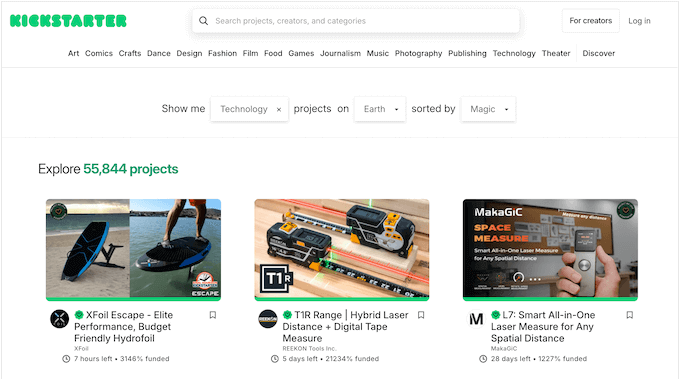
Kickstarter 5% fee on funded projects Creative projects Global crowdfunding platform for creative projects 5%
Indiegogo 5% platform fee, plus 3% payment processing fee Flexible campaign types with versatile funding options Flexible and fixed funding options 5% platform fee, plus 3% payment processing fee

Why Not Use GoFundMe?

When you need to raise money online, GoFundMe is often the first name that pops into people’s minds. It’s certainly popular, but relying on it can come with hidden costs and downsides.

Here are the main reasons why I recommend looking for a GoFundMe alternative, and especially accepting donations through your own website:

  • You avoid the “voluntary tip” model: GoFundMe removed its core platform fee, but it now asks your donors for a voluntary tip to support the platform. This can be confusing or distracting for your supporters and may reduce the amount they intend to give to your cause. When you use a WordPress plugin, you only pay the standard payment processor fee (from Stripe or PayPal) without asking donors for an extra platform contribution.
  • You own your supporter list: This one is huge. When you use a plugin on your own site, you have full access to your donor information. This means you can build your own email list, send personalized updates, and build real relationships that last long after the campaign is over.
  • You get a professional, branded Look: Instead of a standard GoFundMe page that looks like everyone else’s, you can create a donation page that perfectly matches your website’s look and feel. This builds trust and makes your project look much more professional.
  • You unlock powerful fundraising tools: Many plugins and platforms come with features that GoFundMe doesn’t offer. I’ve seen people use a GoFundMe alternative to set up recurring monthly donations, create team fundraising pages, and even track offline donations like cash or checks.
  • You’re in complete control: Your fundraising page lives on your website. You don’t have to worry about a platform changing its rules or shutting down your page. It’s your campaign, on your terms.

Choosing the right tool always depends on your specific needs. But moving away from a one-size-fits-all platform like GoFundMe gives you the freedom and power to build a thriving community around your cause.

How I Test and Review Donation Platforms / Plugins

When I recommend any tool or WordPress plugin, I make sure all my advice comes from real-world experience. I’ve seen firsthand how the right tool makes all the difference, and how the wrong one can cause real problems.

I remember testing crowdfunding platforms that looked good but failed when I tried to do something simple, like download a list of donor email addresses.

That’s why I developed a thorough, hands-on testing process. I put every single tool through a series of real-world scenarios so I can tell you what it’s really like to use it.

Here’s a peek at my testing checklist:

I check for compatibility: A fundraising tool must work well with your other plugins and your WordPress theme. I also test how it integrates with popular email marketing services and other essential tools you may be using on your site.

I set up a real campaign: I don’t just look at screenshots. I build an actual donation form from scratch and test the entire experience from the supporter’s point of view. I want to know exactly what your donors will see.

I test the donor data: This is a huge one for me. Can you actually export your supporters’ information easily? I check to see how complete that data is, and whether it’s a format you can actually use for your email list or records.

I contact customer support: I’ll reach out to the support team with a few common questions that I know our readers will have. I then time how long it takes for them to respond, and how helpful those responses actually are.

Why Trust WPBeginner?

Here at WPBeginner, we’ve been helping people with their WordPress websites for over 15 years. We’ve guided millions of people through choosing the right tools for their websites and online businesses.

Beyond that, we’ve personally gained hands-on experience in the world of fundraising and nonprofit operations via our Balkhi Foundation, including building schools and providing scholarships. This background gives us a unique perspective on which donation tools truly deliver.

Our promise to you is simple: we only recommend products that we would confidently use on our own projects. You can read more about this process in our editorial guidelines.

Now, let’s take a look at my top picks for all kinds of nonprofits and fundraising campaigns.

1. Charitable – Best GoFundMe Alternative for Custom Donation Campaigns

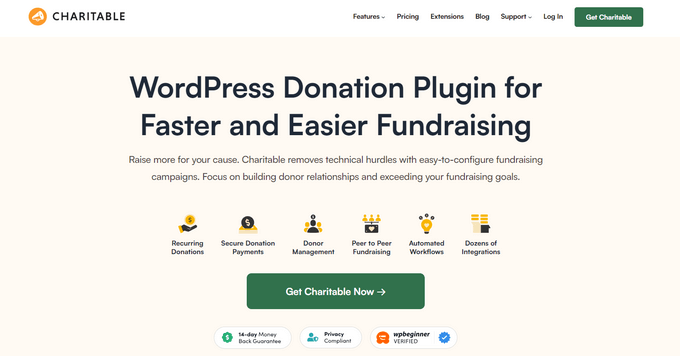
The WP Charitable donation plugin for WordPress
Charitable Pros ✅ Comprehensive donor management portal
✅ Highly customizable donation forms
✅ Supports multiple payment gateways
✅ Easy offline donation management
✅ Detailed reporting tools
Charitable Cons ❌ Peer-to-peer fundraising requires Pro plan or higher
❌ Initial setup can be complex for beginners
Pricing Starts at $69/year. 0% transaction fees.
Best For Organizations needing advanced tools like donor leaderboards, comprehensive supporter management, and flexible, branded forms.

Charitable is a WordPress plugin that specializes in giving you complete control over your donation campaigns and forms.

While many plugins offer a basic ‘Donate Now’ button, Charitable stands out by letting you build attractive, customizable donation pages that perfectly match your website’s brand.

💡 Want to dive deeper? Read our hands-on Charitable review now to see exactly how this donation plugin works.

My Experience

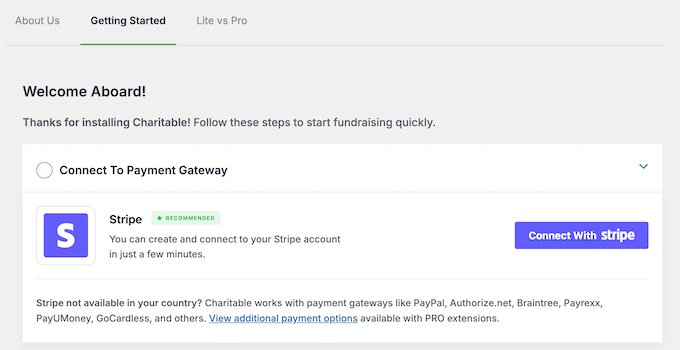
When I tested Charitable, I found the setup process was pretty straightforward. Connecting it to my PayPal and Stripe accounts was simple, and I was ready to accept online payments in just a few minutes.

How to set up the WP Charitable WordPress plugin

The feature I was most excited to test was the ability to create different types of fundraising campaigns.

I quickly set up a ‘goal campaign’ with a donor leaderboard and a dedicated page showcasing supporters.

The campaign forms themselves are highly customizable, so I had no problems adjusting fields and colors to match my theme perfectly. This is fantastic for building donor trust.

I could also easily add a fundraising thermometer to show potential supporters how close I was to reaching my fundraising goals.

Examples of crowdfunding projects, created using WP Charitable

Another feature that really stood out to me was the comprehensive donor management portal.

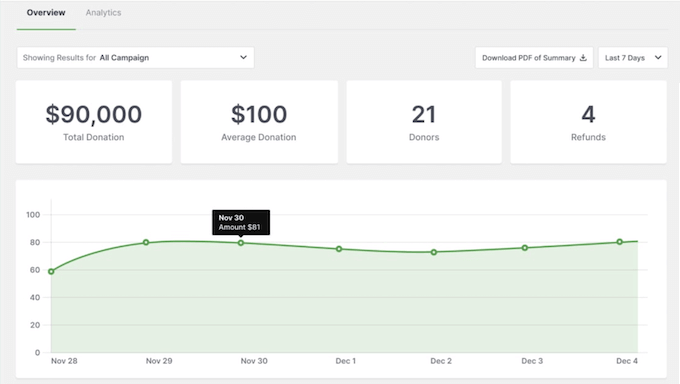
After my tests, I could see simple, clear reports showing exactly how much money came in.

Tracking your donations in the WordPress dashboard

Plus, the plugin offers advanced features like tracking ‘offline donations’ right in the dashboard, ensuring my campaign progress bar stayed accurate. This is a huge time-saver.

Unlike GoFundMe, Charitable gives you full ownership of your donor data and offers a clear, tip-free donation experience. This makes it a much better long-term solution for serious fundraising.

Overall, I found Charitable to be a solid choice for organizations that need control over their donation process and want advanced tools to engage donors, like leaderboards and branded campaign pages.

Why I Recommend Charitable: The plugin lets you create beautiful, highly customized donation forms and pages, which is a huge advantage for professional branding. Plus, it includes powerful advanced features like donor leaderboards and the ability to seamlessly manage both online and offline contributions in one place.

2. WP Simple Pay – Best for Simple Recurring Donations

The WP Simple Pay payments and donation plugin for WordPress
WP Simple Pay Pros ✅ Fast 5-minute setup with Stripe
✅ Supports recurring donations for steady income
✅ No monthly fees, just Stripe processing costs
✅ Accepts Apple Pay and Google Pay
WP Simple Pay Cons ❌ Not a full crowdfunding platform
❌ Limited donor management features
❌ Only works with the Stripe payment gateway
Pricing Starts at $49.50/year. 0% transaction fees.
Best For Simple subscription forms and ongoing monthly support without campaign complexity

WP Simple Pay focuses on doing one thing really well: letting you accept donations through Stripe right on your WordPress blog or website.

It’s built for people who need straightforward fundraising without the complexity of a full crowdfunding platform.

WP Simple Pay is superior to GoFundMe for long-term projects because it focuses on generating steady, recurring monthly support – a feature GoFundMe doesn’t natively support.

My Experience

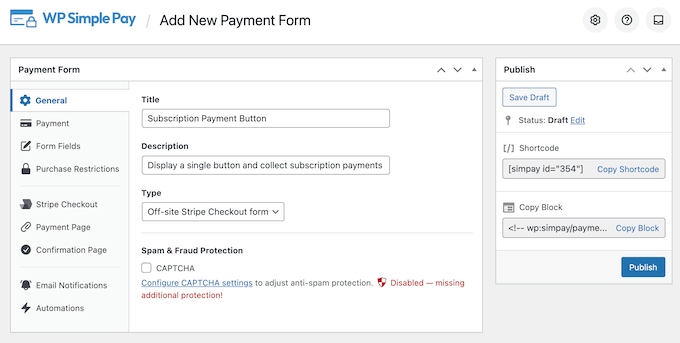
During testing, the first thing that struck me was how easy it was to get going. The setup wizard helped me connect my site to Stripe and create a live subscription form in less than five minutes.

How to quickly and easily accept donations on your WordPress website

I wanted to see how WP Simple Pay handled recurring monthly donations, since this is a feature many of our readers need.

Compared to other platforms, WP Simple Pay makes this process very easy.

Accepting recurring payments on your WordPress blog or website

I particularly liked the ‘custom amount’ feature, as it lets your supporters choose their own contribution level. It’s a small touch that makes a big difference.

After adding a form to my site, I found the payment process was completely seamless. WP Simple Pay includes Apple Pay and Google Pay options, which makes it easier for people to donate on their mobile phones.

It’s important to know that WP Simple Pay isn’t designed for complex campaigns. You won’t find features like fundraising goal thermometers or supporter reward levels.

But honestly, for organizations that just want to set up a stream of steady, monthly support, this plugin’s simplicity is a huge bonus. There’s nothing extra to get in your way.

Why I Recommend WP Simple Pay: This plugin makes setting up recurring donations simple and affordable. You also avoid the voluntary tip model used by platforms like GoFundMe, so you can keep more of your money by limiting fees to only the standard payment processor fee.

⭐ Considering using the WP Simple Pay plugin? Find out if it’s the right fit by exploring our in-depth WP Simple Play review.

3. WPForms – Best for Data-Driven Donation Forms

The WPForms form builder and donation collect plugin
WPForms Pros ✅ Very user-friendly with straightforward setup
✅ Multiple payment gateway options for flexible collection
✅ Pre-built templates make starting easy
✅ Extensive documentation and support available
WPForms Cons ❌ Does not support peer-to-peer fundraising campaigns
❌ Less popular payment gateways might need extra effort
Pricing Starts at $49.50/year. 0% transaction fees.
Best For Creating highly optimized donation forms with advanced data collection and donor segmentation

WPForms is a powerful form builder plugin for WordPress that’s fantastic for fundraising, especially when you want to do more than just collect money.

It’s perfect for situations where you want to gather detailed information to really understand and connect with your supporters.

💡 Get the full scoop! I put this plugin to the ultimate test in our hands-on WPForms review.

My Experience

The first thing I noticed is how easy it is to create a form using WPForms’ drag-and-drop builder.

It felt really intuitive, and they have lots of pre-built donation templates, so you don’t have to start from scratch.

How to accept payments in WordPress using a form builder

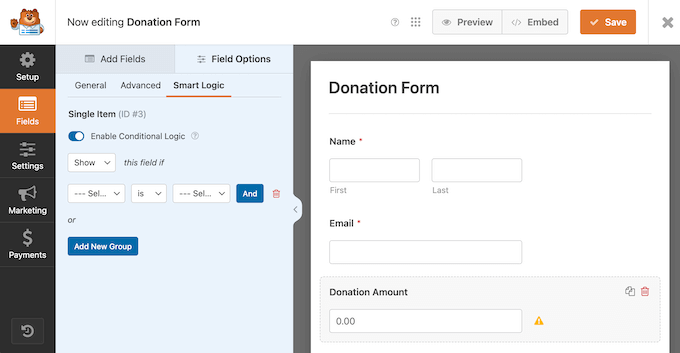
But my favorite feature is the Conditional Logic.

This sounds a bit technical, but it’s actually simple and incredibly powerful.

Creating forms with conditional logic

For my campaign, I set up a form asking donors which project they wanted to fund: ‘Urgent Medical Supplies’ or the ‘Community Rebuilding Fund’.

If a donor chose ‘Community Rebuilding Fund’, then I showed them a new field asking if they’re interested in volunteering for a clean-up day. It’s an amazing way to build a community around your cause, and not just collect money.

In my experience, this level of smart, data-driven donor segmentation is simply impossible with a basic GoFundMe page.

After that, I connected the form to my email marketing service. Based on their answers, I added each supporter to one of three different email lists so they could receive targeted updates. This feature alone saved me hours of tedious manual work.

Of course, WPForms handles the money side of things perfectly, too. WPForms connects directly to your PayPal or Stripe account, so you can avoid any tip requests or additional fees.

After testing WPForms, I saw how this tool could transform your fundraising. It’s the combination of direct payments and smart donor engagement that makes WPForms such a powerful GoFundMe alternative.

Why I Recommend WPForms: This plugin is much more than a simple donation button; it combines payments with powerful tools for gathering donor information. With WPForms, you can understand your supporters better and build stronger long-term relationships through smarter communication.

4. GiveWP – Best WordPress Plugin for Comprehensive Donation Management

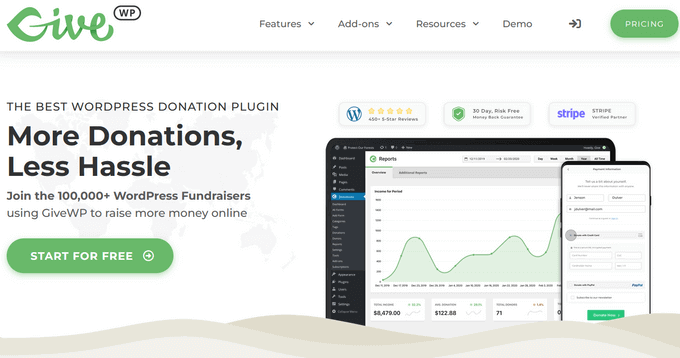
The GiveWP crowdfunding plugin for WordPress
GiveWP Pros ✅ Specifically designed for donation management and fundraising
✅ Extensive integration options with various payment gateways
✅ Robust donor management features improve engagement and tracking
✅ Features advanced reporting that helps analyze donation trends
GiveWP Cons ❌ May require additional customization to match specific branding requirements
❌ You may need to install and setup multiple add-ons, depending on your specific needs
Pricing Starts at $149/year. 2% fee (lite version only).
Best For Organizations needing a complete donation platform with detailed donor tracking and advanced reporting

GiveWP is a dedicated fundraising plugin that’s built specifically for non-profits.

Unlike a general-purpose form builder, every feature in GiveWP is designed to help you manage and grow your crowdfunding campaigns. This deep focus makes it a far more powerful and professional solution than GoFundMe for any serious nonprofit.

My Experience

For this test, I wanted to create the kind of campaign you’d typically see on GoFundMe.

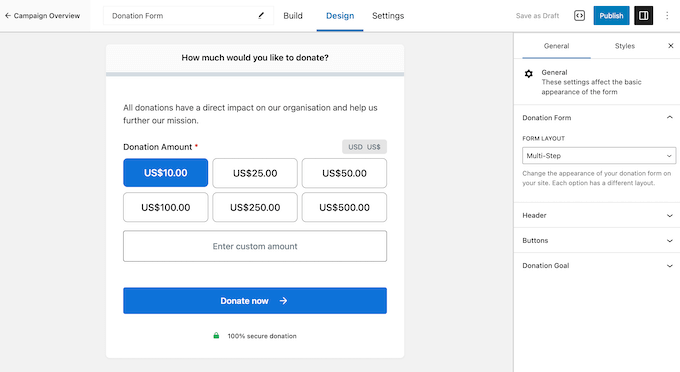
I used GiveWP’s visual form builder to set a donation goal, add multiple suggested giving amounts, and display a progress bar. The entire process felt intuitive and gave me far more control over the look and feel than a standard GoFundMe page.

How to create donation and fundraising forms in WordPress

But the feature that really shows why GiveWP is such a great alternative is its ‘donor management.’

After running a few test donations, I checked the donor history section. GiveWP had created a complete profile for each supporter, showing me every single donation they’d made and their total lifetime giving. By contrast, GoFundMe only provides simple transaction lists.

GiveWP’s reporting tools were just as powerful. I could easily track donation trends and see which campaigns were performing the best.

Viewing your financial support in WordPress

This kind of insight helps you make decisions based on real data, not just guesswork. It transforms fundraising from a one-off event into a long-term strategy, helping you build lasting relationships with the people who support your cause.

Why I Recommend GiveWP: This plugin provides professional-level donor management tools, giving you full ownership of your data in a way that GoFundMe doesn’t. The detailed tracking and reporting help you understand your donors better, which is key to building strong, long-term relationships beyond a single campaign.

5. Formidable Forms – Best WordPress Plugin for Complex Multi-Step Donation Campaigns

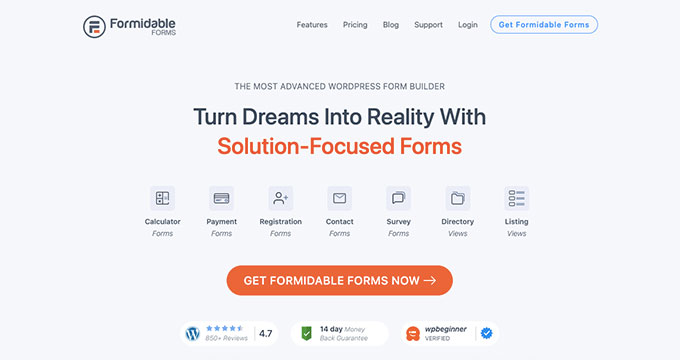
An example of a GoFundMe alternative for WordPress
Formidable Forms Pros ✅ Advanced form builder with drag-and-drop interface
✅ Supports PayPal and Stripe payment integrations
✅ Conditional logic for tailored donation experiences
✅ Multipage forms with progress indicators
Formidable Forms Cons ❌ Might require additional plugins for full functionality
❌ More complex setup than simpler alternatives
Pricing Starts at $79.60/year. 3% application fee (Lite, Expired, Basic, & Plus licenses).
Best For Organizations needing customized, dynamic donation forms with complex logic and multi-step processes

Formidable Forms is a very advanced form builder, and it’s a great GoFundMe alternative if you need something more complex than a simple ‘donate now’ button.

It’s designed for creating completely custom, multi-step donation experiences right inside WordPress. While GoFundMe offers one single, static donation form, Formidable Forms lets you create a dynamic, multi-page funnel.

My Experience

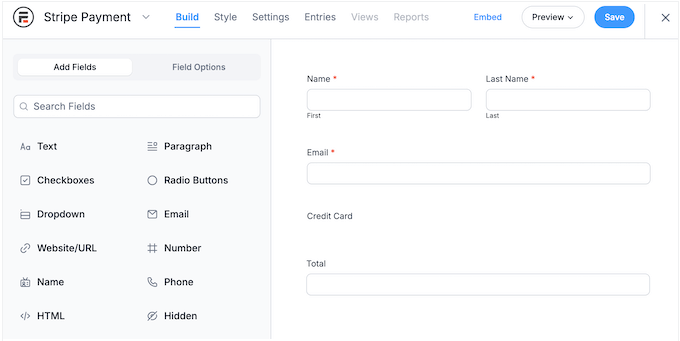
I’ll be upfront: Formidable Forms has more of a learning curve than some of the simpler plugins. Because it’s so powerful, it took me a little while to get familiar with all the options, but its drag-and-drop builder helped a lot.

The Formidable Forms drag-and-drop interface

I wanted to test something that would be impossible to achieve on a platform like GoFundMe, so I decided to create a guided, multi-page donation process.

The first feature I loved was the ‘Progress Bar’. As I clicked through my test form, Formidable Forms displayed a little bar showing exactly how close I was to finishing. It’s a small detail, but it really does help to keep people engaged.

However, the real power lies in its conditional logic. Just like WPForms, Formidable Forms can show or hide different questions based on the user’s answers. This level of custom interaction ensures you collect better data compared to a static GoFundMe page.

It made the whole process feel like a smart, guided conversation rather than just a long, static form. Even when I created a detailed, three-page form, the experience felt smooth and never overwhelming.

Why I Recommend Formidable Forms: It’s perfect for when you have very specific needs that a one-size-fits-all platform like GoFundMe can’t handle. Plus, Formidable Forms really excels at creating multi-step, intelligent forms that guide your donors through the process smoothly.

📝 Want more info? Check out our comprehensive Formidable Forms review for an insider’s look.

6. Kickstarter – Best GoFundMe Alternative for Creative Projects Needing Community Support

The Kickstarter crowdfunding platform
Kickstarter Pros ✅ Large, engaged community of backers
✅ All-or-nothing funding builds urgency
✅ Proven track record for creative projects
✅ Built-in credibility and trust
Kickstarter Cons ❌ High fees (5% plus processing costs)
❌ All-or-nothing model is risky
❌ Limited control over branding and data
Pricing 5% fee on funded projects + 3-5% processing
Best For Creative projects that benefit from community backing and structured campaigns

Kickstarter is a huge name in the creative world, and it’s a very different kind of GoFundMe alternative.

It’s not for personal fundraising, but rather a launchpad for ‘creative projects’ like new products, games, and films, connecting you with an audience that’s ready to back new ideas.

Unlike GoFundMe, which is primarily for personal causes and medical expenses, Kickstarter is a project-based platform focused on delivering a specific creative product.

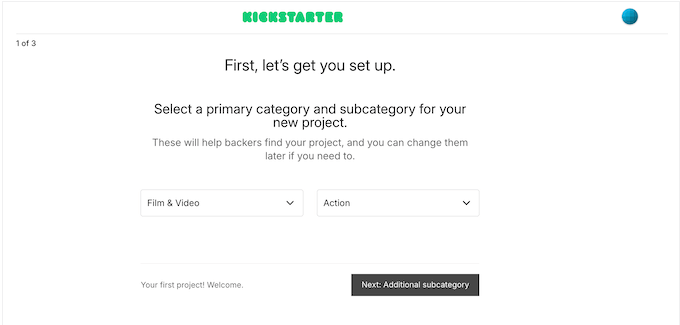
Kickstarter – Best GoFundMe Alternative for Creative Projects Needing Community Support
My Experience

To get a real feel for how Kickstarter works, I spent a lot of time talking with creators who have run successful campaigns. Their feedback was incredibly consistent and really highlighted the platform’s unique strengths.

The number one thing everyone mentioned was the power of the Kickstarter community. Unlike asking for donations on your own site, you’re putting your project in front of an audience actively looking for new and interesting things to support.

Another key point they brought up was the ‘all-or-nothing’ funding model.

It sounds scary, but users told me it actually helps a lot. This model creates a real sense of urgency that motivates people to back the project. It also builds trust because backers know they won’t be charged unless the project is definitely going ahead.

Of course, there are some trade-offs.

You’re essentially ‘renting’ an audience on someone else’s platform. The fees are also higher than running campaigns on your own nonprofit website, and you don’t have the same level of control.

However, everyone I spoke with confirmed that having access to a built-in, enthusiastic community was worth the trade-off.

They also loved that Kickstarter handles all the complicated technical stuff like payment processing and backer updates, so they can focus on their project instead of running a WordPress website.

Why I Recommend Kickstarter: This platform connects your creative project with a massive, engaged community that’s actively looking for ideas to support. The ‘all-or-nothing’ model and review process also give your project instant credibility and build trust with potential backers.

In my opinion, Kickstarter is a much better choice than GoFundMe for launching a product or creative work due to the specialized audience and accountability system.

7. Indiegogo – Best GoFundMe Alternative for Flexible Funding Options

The Indiegogo crowdfunding platform
Indiegogo Pros ✅ Offers both flexible and fixed funding options
✅ Strong visual and promotional tools
✅ Dedicated customer support and resources
✅ Allows continued fundraising through InDemand
Indiegogo Cons ❌ Platform fees can add up quickly
❌ Limited branding and customization options
❌ Less focus on creative projects than Kickstarter
Pricing 5% platform fee + 3% + $0.20 processing fees
Best For Creators seeking funding flexibility and continued post-campaign support

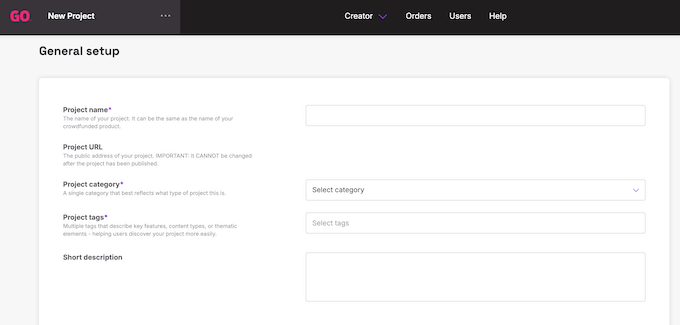
Indiegogo is another major crowdfunding platform, and it’s an interesting GoFundMe alternative thanks to the unique options it offers.

Indiegogo is built for launching products and creative ideas, but with more flexibility than most other platforms. This flexibility gives Indiegogo an advantage over both Kickstarter’s strict ‘all-or-nothing’ model and GoFundMe’s simple donation format.

Indiegogo – Best GoFundMe Alternative for Flexible Funding Options


My Experience

Just like with Kickstarter, I wanted to get the real story, so I chatted with several creators who have run successful campaigns on Indiegogo.

The first thing they all brought up was the flexibility in funding. You get to choose between ‘fixed funding’ and ‘flexible funding’. If you opt for flexible funding, then you can keep all the money you raise even if you don’t hit your goal.

They told me this choice was a huge relief, as it means projects can still move forward with partial funding. But the feature they were most excited about was ‘InDemand’. They described it as a total game-changer.

Basically, once your main campaign is over, Indiegogo lets you keep taking orders and raising funds seamlessly. The creators I spoke to said this feature alone made the platform fees worth it, as it automatically handled all the complex parts of post-campaign sales and kept momentum going.

Keep in mind that, like other big platforms, there’s a trade-off.

You’re paying fees and giving up some control in exchange for access to Indiegogo’s huge community. But the creators I spoke with all felt that Indiegogo’s global reach was a worthwhile trade-off, especially as it’s something they couldn’t easily replicate on their own website.

While GoFundMe is better for urgent personal causes, Indiegogo is far superior for product launches that need continued post-campaign sales.

Why I Recommend Indiegogo: This platform offers flexible funding options, so you can choose the model that best suits your project’s needs. In addition, Indiegogo’s ‘InDemand’ feature is a game-changer, as it lets you continue raising funds and taking orders long after your campaign has ended.

For creators, this is much better than GoFundMe’s rigid, one-time donation structure.

What Is the Best GoFundMe Alternative?

After testing all these tools, I’d typically recommend Charitable for most users. You get complete control over your fundraising while also owning all your donor information.

It’s fantastic for non-profits and anyone who wants to create professional, custom donation forms right on their own WordPress site without asking their donors for platform tips.

Of course, it’s not the only great option.

If your main goal is setting up recurring monthly donations as quickly as possible, then WP Simple Pay is a brilliant choice. And if you need to build really smart, detailed forms that change based on a donor’s answers, then WPForms is incredibly powerful.

Both of these let you build on your own site, giving you control and saving you money by ensuring all funds go to your cause.

If you’re ready to move beyond the limitations of GoFundMe and start building lasting relationships with your supporters, I’d recommend starting with Charitable. You can try out the free version directly from WordPress.org to get a feel for it.

Once you see how powerful it is, you can always upgrade to unlock its more advanced features.

FAQs About GoFundMe Alternatives

Switching from a platform like GoFundMe can feel like a big step, and it’s normal to have a few questions before you dive in. Here at WPBeginner, we get questions from our readers all the time about which tools are best and how to get started.

To help you out, I’ve put together answers to some of the most common questions I see. My goal is to give you the confidence you need to pick the perfect GoFundMe alternative for your project.

What’s the main advantage of using a WordPress plugin instead of GoFundMe?

The biggest advantage is that you own and control 100% of your donor information.

When someone donates on GoFundMe, their contact information essentially belongs to GoFundMe. I’ve found this is the biggest frustration for people who use the platform. You can’t easily download a list of your supporters to build a real relationship with them.

With a WordPress plugin, donor information is stored on your website.

This is a huge deal. It means you can build your own email list, send a personalized thank-you note, and keep your community updated on your progress long after the campaign is over. You’re building a real community for the future, not just collecting a one-time payment.

Can I collect recurring donations in WordPress?

Absolutely! This is actually one of the best reasons to use a WordPress plugin for your fundraising.

Setting up a base of steady, recurring support is a fantastic way to ensure your project or cause has long-term stability.

From my testing, almost all the top donation plugins handle this really well. I was especially impressed with WP Simple Pay if you want to get a simple monthly donation form up and running as fast as possible.

If you need more advanced features, then WPForms is incredibly powerful and lets you create recurring donation forms with ease.

Do I need technical skills to set up these GoFundMe alternatives?

No! You definitely don’t need to be a developer to use these GoFundMe alternatives.

I know fundraising on your own site can feel intimidating compared to using a platform like GoFundMe. However, these tools are all very beginner-friendly.

Most of the plugins in this guide have amazing drag-and-drop builders, so you can just click and add the fields you want to use. There’s no coding involved at all.

Many of them also have setup wizards that walk you through getting started, step-by-step.

Who is GoFundMe’s biggest competitor?

GoFundMe has several major competitors, but the ‘biggest’ one depends entirely on your goals.

For large-scale creative projects, platforms like Kickstarter and Indiegogo are strong rivals because they provide access to built-in communities of backers.

However, I believe the best alternative isn’t another platform. Instead, it’s using a dedicated WordPress plugin like Charitable on your own website.

When you host campaigns on your site, you compete with GoFundMe by taking full control of your donor data, customizing your forms, and avoiding the donor confusion caused by voluntary tips.

Is there a better option than GoFundMe?

Yes, I strongly believe there is a better option than GoFundMe, especially if you have a WordPress website.

GoFundMe is fine for a quick, one-time campaign, but it’s not the best choice for building long-term support because it keeps your donor information and asks your supporters for a tip. A better option gives you complete ownership and control.

That’s why I always recommend using a WordPress donation plugin like Charitable on your own site, rather than an external service like GoFundMe.


More Resources for Fundraising

I hope this guide has given you the confidence to take control of your fundraising.

No matter whether you’re starting your very first campaign or making the move away from GoFundMe, it can feel like there’s a lot to learn.

To help you with the next steps, I’ve collected some essential resources below. They’re packed with tips for improving your site and growing a passionate community around your cause:

If you liked this article, then please subscribe to our YouTube Channel for WordPress video tutorials. You can also find us on Twitter and Facebook.

The post I Tried 7 Best GoFundMe Alternatives (Raise More, Pay Less) first appeared on WPBeginner.


from WPBeginner https://ift.tt/1q6U8vG
More links is https://mwktutor.com